
Google Snake Game Easter Eggs: 15+ Secrets You Probably Never Knew
What if the simple Google Snake game you play when you are bored has a ton of secrets hiding inside it? It does. Google stuffed this little browser game with hidden modes, secret shortcuts, rare items, and a lot more that most players never find.
I have been playing this game since Google first added it back in 2017, and I keep finding new things. This article covers every easter egg I have found so far, along with ones reported by the gaming community on Reddit and other forums.
What Is the Google Snake Game?
The Google Snake game is a free browser game made by Google. It is based on the classic Snake game from the late 1990s that was popular on Nokia phones. Google released it on September 27, 2017, as part of its 19th Birthday Google Doodle. Since then, it has stayed available as a permanent software egg and Google Search hidden feature for anyone to find.
You do not need to download anything. You do not need an account. Just search and play.
How Do You Open the Google Snake Game?
You can start playing in about five seconds. Here is what to do:
- Open Google Search on any browser (Chrome, Firefox, Safari, Edge, or even your phone’s browser).
- Type snake, play snake, or snake game in the search bar.
- Press Enter.
- A small game box appears at the top of the search results. Click the Play button.
That is all it takes. No app install, no sign-up, no payment.
What Are the Controls for Google Snake?
The controls depend on what device you are using:
- On a computer: Use the arrow keys (Up, Down, Left, Right) or the WASD keys to steer the snake.
- On a phone or tablet: Swipe your finger in the direction you want the snake to move.
There are also a few keyboard shortcuts most players do not know about:
- Press T to show a game timer on screen.
- Press M to turn the sound on or off.
- Press Enter or Spacebar to restart quickly after a game over.
These shortcuts work on the desktop version of the game inside Google Search.
How Many Game Modes Does Google Snake Have?
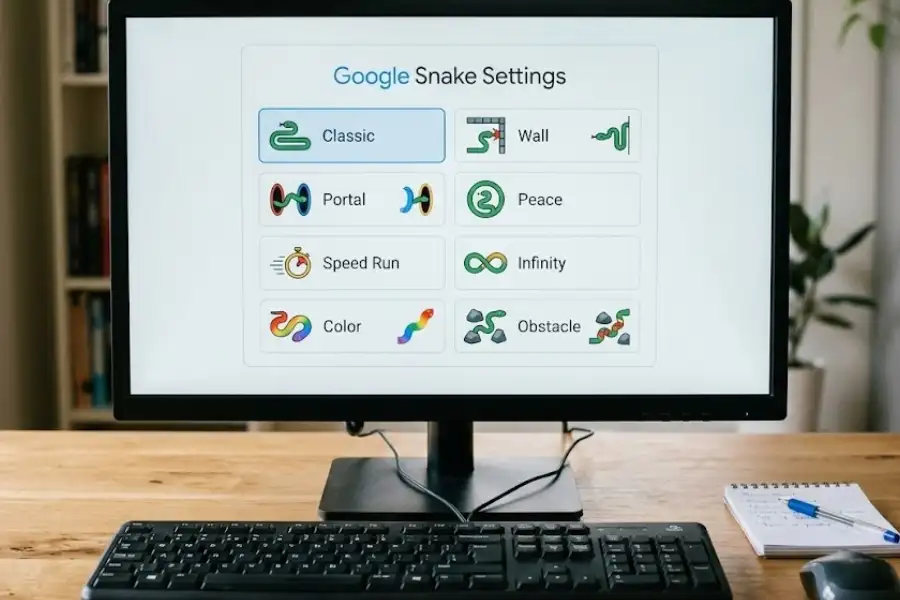
Google Snake has more than 10 game modes. Most players only ever try the Classic mode, but there are at least 11 different modes you can pick from the settings menu. Here is the full list with details on what each one does:
Classic Mode
This is the default mode. The snake eats food, grows longer, and the game ends if you crash into the walls or your own body. Simple and straightforward.
Wall Mode
Each time the snake eats food, a random brick wall appears on the board. The more food you eat, the more walls show up. It gets crowded fast, and one wrong move ends the game.
Portal Mode
After eating food, your snake gets teleported to a random spot on the board. You have no control over where you land. This makes planning almost impossible and keeps every round unpredictable.
Peace Mode
Can you play Google Snake without dying? Yes. Peace Mode is the answer. In this mode, the snake passes through walls and through its own body without any penalty. The game only ends when you choose to stop or when you eat every food item on the board. This is the best mode for beginners who want to practice without pressure.
Yin Yang Mode
A second snake appears on the board and mirrors every move you make, but in the opposite direction. If your snake and the mirror snake collide, the game ends. It feels like playing against a shadow version of yourself.
Twin Mode
Every time the snake eats food, the head and tail swap positions. So the head becomes the tail, and the tail becomes the head. Your brain has to adjust to a new direction after every single bite.
Winged Mode
The food does not sit still in this mode. It bounces around the board, hitting the edges and even bouncing off the snake’s body. You have to chase it down, which adds a completely different layer of challenge.
Key Mode
A locked block sits on the board. You have to pick up a key first, then go to the block to open it and grab the food inside. If you hit the locked block before grabbing the key, the game is over.
Light Mode
Almost the entire board goes dark. You can only see a small circle of light around your snake’s head. Everything else is pitch black. It feels like navigating with a flashlight in a dark room, and it is one of the most tense modes in the game.
Statue Mode
When the snake eats food, parts of its body turn into permanent blocks that stay on the board. Your own snake creates obstacles as you play. The longer the game lasts, the harder it becomes.
Blender Mode
What is Blender Mode in Google Snake? This is one of the least-known modes. Blender Mode lets you combine two or more game modes together into a single round. For example, you can play Portal Mode with Wall Mode at the same time, or mix Yin Yang with Light Mode. It creates completely new gameplay that no single mode offers on its own.
Can You Change How the Snake Looks?
Yes. Google Snake lets you change both the snake’s appearance and the type of food it collects.
How to Change Snake Skins
Before starting a game, look for the palette icon in the settings area. You can pick from multiple snake colors. The most popular choice is the rainbow skin, which gives the snake a multi-colored look that shifts as it moves across the board.
How to Change Food in Google Snake
You are not stuck with the default apple. The game offers 14 different food options:
- Bananas
- Strawberries
- Cherries
- Blueberries
- Watermelons
- Pineapples
- Oranges
- Mushrooms
- Broccoli
- Carrots
- Eggplants
- Pumpkins
- Radishes
- A bowl of mixed fruit
Changing the food does not affect gameplay. It is a visual customization, but it adds a fun personal touch to each round.
What Speed and Board Size Options Are Available?
Google Snake gives you control over two important settings: speed and board size.
Speed Settings
- Turtle speed: The snake moves very slowly. Best for beginners or a relaxed session.
- Snake speed (Normal): The default. A good balance between challenge and control.
- Rabbit speed: The snake moves very fast. One wrong turn and the game is over. This is for experienced players who want a real test.
Board Size Settings
- Small: A 10 by 9 grid. Very tight space. You run out of room quickly.
- Regular: A 17 by 15 grid. The standard experience most players use.
- Big: A 24 by 21 grid. Much more room to move, but food can spawn far away from you.
Try mixing different speeds and board sizes to create your own level of challenge. Rabbit speed on a small board is extremely difficult. Turtle speed on a big board is very relaxing.
What Is the Golden Apple in Google Snake?
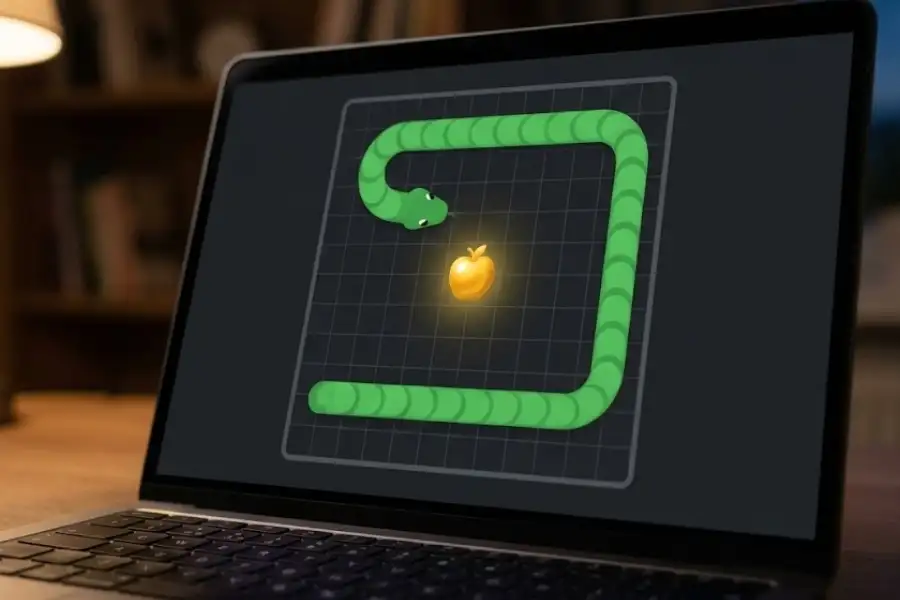
The golden apple is one of the rarest and most mysterious easter eggs in the Google Snake game. Several players on Reddit have reported seeing a gold or yellow-colored apple appear during gameplay. It looks noticeably different from the regular food item.
When a snake eats the golden apple, the game ends immediately. There is no crash, no wall collision. The game simply stops and displays your final score.
No one has confirmed exactly what triggers it. Some players believe it appears after reaching a high score. Others think it is completely random. Google has never released an official statement about the golden apple, which is what makes it one of the most talked-about mysteries in the game.
Does Google Snake Have a Dark Mode?
Yes, Google Snake has a dark mode. You can turn it on from the settings before starting a game. The dark theme changes the background to a darker color scheme, which is easier on the eyes if you are playing at night or in a dimly lit room.
What Happened to the Google Maps Snake Game?
In April 2019, Google launched a special version of the Snake game inside Google Maps as an April Fools’ Day event. Instead of a snake on a plain board, players controlled a train moving through real city streets.
Six cities were available to play on:
- Cairo, Egypt
- London, United Kingdom
- Sydney, Australia
- San Francisco, United States
- São Paulo, Brazil
- Tokyo, Japan
Each city had a unique map based on its real street layout. The train picked up passengers and grew longer, just like the classic Snake game. Much like other retired Google Search Easter Eggs that come and go, Google officially retired the Google Maps Snake game in early 2025. The original version at snake.googlemaps.com is no longer active, but fan-made recreations can still be found on sites like elgooG.
What Was the 2025 Year of the Snake Google Doodle?
For the Lunar New Year in January 2025, Google released a special Snake game as a Google Doodle for the Lunar New Year. Since 2025 is the Year of the Snake on the Chinese zodiac, Google gave the classic game a full refresh. This limited-time version included several features not found in the regular game:
- Updated visuals: The graphics received a fresh, modern redesign.
- Daily challenges: New objectives every day to give players a reason to come back.
- Gold Envelope power-up: Collecting one gave a 3x score multiplier and temporarily slowed down time.
- Other power-ups: Double Points, Slow-Motion, and Invincibility appeared in various rounds.
- Fluid movement: In some modes, the snake moved smoothly across the screen instead of jumping tile by tile.
Google Doodle games are temporary and usually get taken down after a few weeks. But the 2025 Year of the Snake Doodle proved that Google continues to invest creative effort into updating this classic game for new audiences.
What Are Google Snake Mods?
Google Snake mods are fan-made modifications that change or expand the game beyond what Google offers. They are created by independent developers in the modding community and typically run inside your browser without needing any software installation.
Some of the most popular Google Snake mods include:
- Mouse Mode: Lets you control the snake with your mouse cursor instead of keyboard arrows.
- Invisible Snake: The snake disappears from view. You have to remember its position based on your inputs.
- Level Editor: Lets you design custom maps and play on them.
- More Menu Mod: Adds extra options to control speeds, maps, and obstacles.
- Custom Skins and Themes: Changes the visual style of the entire game.
You can find these mods through Google Snake mod loader websites. They run in your browser and do not require downloading files to your computer. Always use mods from well-known, trusted sources. Avoid any site that asks you to install programs or browser extensions you are not familiar with.
How Do You Get a High Score in Google Snake?
Getting a high score takes practice and strategy. Here are six tips that work well based on hundreds of rounds of gameplay:
- Hug the edges early on. Keep the snake near the walls at the start of the game. This keeps the center of the board open, which gives you room to maneuver when the snake gets long.
- Use the S-curve technique. Once the snake gets very long, move it in tight S-shaped patterns. This stacks the body neatly and reduces the chance of trapping yourself in a corner.
- Start on Turtle or Normal speed. Rabbit speed is exciting, but it leaves almost no time to react. Build your skills on a slower speed first.
- Always plan your next two moves. Do not only look at where the food is right now. Think about where the snake will be after it eats, and plan your next turn before you get there.
- Watch your tail. Most game overs happen because the snake runs into its own tail on a turn. Always be aware of where the back of the snake is.
- Practice in Peace Mode. Since the snake cannot die in Peace Mode, it is the perfect way to learn the controls, test strategies, and get comfortable with all three board sizes before playing for real.
Frequently Asked Questions
How many game modes does Google Snake have?
Google Snake has more than 10 game modes. The main ones are Classic, Wall, Portal, Peace, Yin Yang, Twin, Winged, Key, Light, Statue, and Blender. Blender Mode lets you combine multiple modes into one round for a custom experience.
Is there a way to play Google Snake without dying?
Yes. Select Peace Mode from the settings before starting. In Peace Mode, the snake passes through walls and its own body. The game only ends when you choose to stop or eat all the food on the board.
What is the golden apple in Google Snake?
The golden apple is a rare easter egg that some players have encountered. It looks like a gold-colored food item. When the snake eats it, the game ends immediately and shows your score. Google has not officially confirmed what triggers it.
Can I still play the Google Maps Snake game?
No. Google retired the Google Maps version of Snake in early 2025. It was an April Fools’ Day special from 2019 that let players guide a train through real city streets. Fan-made copies still exist on some websites.
What are Google Snake mods and are they safe?
Google Snake mods are fan-made add-ons that change the game. Popular ones include mouse controls, invisible snake mode, and level editors. They run in your browser and do not need downloads. Stick to well-known mod loader sites and avoid anything that asks you to install unfamiliar software.
What keyboard shortcuts work in Google Snake?
Press T to show the game timer. Press M to toggle sound. Press Enter or Spacebar for a quick restart after a game over. Use arrow keys or WASD to move the snake.
How do I change the snake’s color or food type?
Look for the palette icon in the game settings before starting a round. You can pick different snake colors, including a rainbow skin. You can also change the food from the default apple to bananas, watermelons, mushrooms, and many other options.
When was the Google Snake game first released?
Google first released the Snake game on September 27, 2017, as part of its 19th Birthday Google Doodle. It has remained available as a Google Search easter egg since then.
Conclusion
The Google Snake game looks like a simple five-minute distraction on the surface. But underneath, it has over 10 game modes, 14 food choices, multiple speed and board size settings, secret keyboard shortcuts, the mysterious golden apple, and an active modding community that keeps adding new features.
Whether you have been playing for years or just found out about it today, there is always something new to try. Go test a mode you have never touched, change up your snake’s look, or hunt for that golden apple.
And if someone tells you Google Snake is just a boring old game, send them this page. They will change their mind fast.