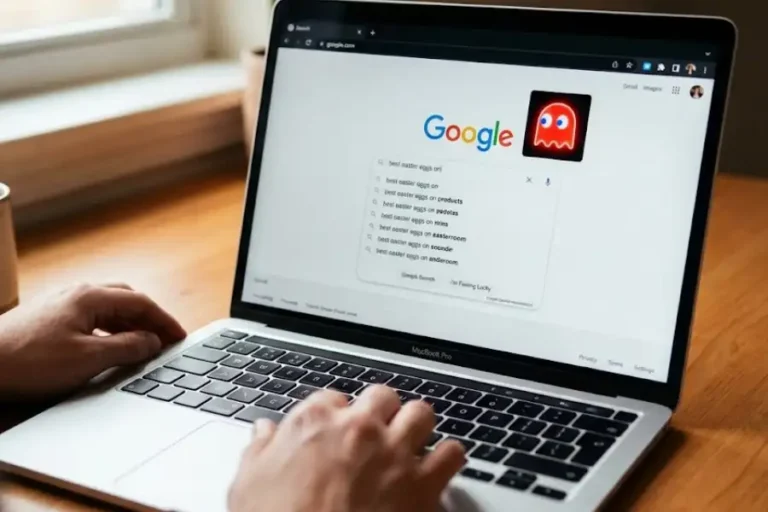

What is Software Egg? Easter Eggs, Python Eggs & Egg.js Explained (2026)
The 3 Different Meanings of “Software Egg”
“What does software egg mean?”
| Type | What It Is | Still Used? |
|---|---|---|
| 1. Easter Eggs | Hidden surprises in apps, games, and websites | Yes, very popular |
| 2. Python Eggs (.egg) | Old Python packaging format | No, rejected by PyPI in August 2023 |
| 3. Egg.js Framework | Node.js web framework by Alibaba | Yes, used in enterprise apps |
Context Matters: If you hear “software egg” in a job interview, it probably means Easter eggs. If you see it in old Python code, it means .egg files. If you work with Chinese tech companies, it might mean Egg.js framework.
Meaning 1: Easter Eggs (Most Common)
This is what most people mean when they say “software egg.” An Easter egg is a hidden surprise that developers put inside their apps for fun. Examples include the Chrome dinosaur game and Google’s “do a barrel roll” trick.
This is our main focus in this article. Keep reading to learn everything about Easter eggs with 30+ examples you can try!
Meaning 2: Python Eggs (Old Packaging Format)
What is a Python Egg?
What it was: A file format (.egg) for packaging Python libraries
Created by: Setuptools project in 2004
Status: Deprecated and rejected
Rejected date: August 2023 by PyPI (Python Package Index)
Replacement: Wheel format (.whl) is now the standard
If you work with Python programming, you might see .egg files in old projects. These were used to share Python code before the Wheel format became popular. PyPI officially stopped accepting .egg uploads in August 2023, so this format is now outdated.
Meaning 3: Egg.js (Node.js Framework)
What is Egg.js?
What it is: A Node.js web framework for building enterprise applications
Created by: Alibaba Group (Chinese tech giant)
Used by: Alibaba, Ant Financial, and many Chinese companies
Website: eggjs.org
Best for: Large-scale business applications
Egg.js is popular in China and is used to power parts of Alibaba’s infrastructure. If you work with cross-cultural development teams or Chinese tech companies, you might hear about Egg.js.
The rest of this article focuses on Easter eggs – the hidden surprises in software. This is the most common meaning and the fun one to learn about!
You know when kids hunt for hidden eggs during Easter? The same idea exists in your computer, phone, and favorite apps!
Developers love hiding little surprises in their software. When you find one, it feels like finding treasure. These hidden features are called Easter eggs, and they have been around since 1967.
In this blog post, I will show you exactly what Easter eggs are, why developers hide them, and give you 30+ examples you can try right now on your own devices.
What is an Easter Egg in Software?
Think of it like this: You buy a toy car. But hidden inside the box, the maker left a small sticker with a funny message just for you. That sticker is like an Easter egg. It is a bonus surprise that makes you smile!
Definition: Software Easter Egg
What it is: A hidden feature, message, game, or joke inside software
Who puts it there: Developers and programmers
Why it exists: For fun, creativity, and to surprise users
Is it safe: Yes, 100% safe and harmless
Related terms: Hidden feature, secret code, bonus content, undocumented feature
What Can an Easter Egg Be?
Easter eggs come in many forms:
- Hidden games – Like the dinosaur game in Google Chrome
- Funny messages – Secret text from developers
- Cool animations – Pages that spin or flip
- Secret pictures – Hidden images in the code
- Inside jokes – References only fans understand
- Developer credits – Names of people who made the software
Why is it Called an “Easter Egg”?
Here is the full story:
In 1979, a programmer named Warren Robinett worked at Atari. He made a game called Adventure for the Atari 2600 console.
Back then, game companies did not put developer names on games. Atari said: “The company made this game, not one person.”
Warren did not like this. So he hid a secret room in his game. When players found this room, they saw the message: “Created by Warren Robinett.”
When Atari found out, the game was already in stores. They could not remove it. A manager named Steve Wright said: “Let us keep these hidden features. They are like Easter eggs for people to find!”
And that is how the term “Easter egg” was born for hidden features in software.

Historical Fact: The oldest known software Easter egg is from 1967-1968 in the TOPS-10 computer system. If you typed “make love,” the computer would respond “not war?” – a reference to the peace movement of that time.
Why Do Developers Hide Easter Eggs in Software?
Reason 1: To Show Their Creativity
Writing code all day can feel boring. Easter eggs let developers show their fun side. It is like an artist signing their painting in a playful way.
Reason 2: To Get Credit for Their Work
Like Warren Robinett at Atari, many developers want people to know who made the software. An Easter egg is a way to say: “I built this!”
Reason 3: To Make Users Happy
Finding an Easter egg feels special. It is like being part of a secret club. When users find these hidden gems, they feel happy and excited.
Reason 4: To Have Fun with Their Team
Some Easter eggs are inside jokes between team members. It is a way for coworkers to have fun together while working hard.
Reason 5: To Create Buzz
When people find a cool Easter egg, they share it with friends. This creates free publicity for the company. People talk about it on social media, write blog posts, and make videos.

Industry Insight: Some big tech companies like Google and Tesla now have official “Easter egg teams” that plan and create hidden features for their products.
Are Easter Eggs in Software Safe?
Easter Eggs vs Bugs: What is the Difference?
| Easter Egg | Bug |
|---|---|
| Put there on purpose by developers | A mistake in the code |
| Fun and harmless | Can cause problems |
| Makes users happy | Makes users frustrated |
| Works perfectly when found | Should not exist at all |
| Hidden but tested | Accidental and broken |
Easter Eggs vs Viruses: What is the Difference?
| Easter Egg | Virus/Malware |
|---|---|
| Made by the software company | Made by hackers |
| Safe and fun | Dangerous and harmful |
| Does not spread | Spreads to other files |
| Cannot steal data | Can steal your information |
30+ Easter Eggs You Can Try Right Now
Go to Google.com and type these words to see fun effects:
| What to Type | What Happens | Why It Works |
|---|---|---|
do a barrel roll | The whole page spins 360 degrees | Reference to Star Fox video game |
askew | The page tilts to one side | The word “askew” means tilted |
Pac-Man | Play the classic Pac-Man game | Celebrating Pac-Man anniversary |
Zerg Rush | Little “O”s attack search results | Reference to StarCraft game |
Thanos | Half of search results disappear | Reference to Avengers movie |
recursion | Google asks “Did you mean: recursion” | Recursion means something that repeats itself |
Google Chrome Dinosaur Game
How to Play the Chrome Dinosaur Game:
- Open Google Chrome browser
- Turn off your internet OR type
chrome://dinoin the address bar - Press the spacebar
- The dinosaur starts running! Jump over cactuses by pressing spacebar
- Duck under birds by pressing the down arrow
Fun fact: The highest possible score is 99,999. After that, the game resets!

Microsoft Browser Easter Eggs
Microsoft Edge Surfing Game:
- Open Microsoft Edge browser
- Type
edge://surfin the address bar - Press Enter
- A fun surfing game starts! Use arrow keys to play
Microsoft Teams Easter Egg
Open any chat in Microsoft Teams and type /snake – a hidden Snake game will start!
Android Phone Easter Eggs
How to Find Android’s Secret Easter Egg:
- Open your phone’s Settings
- Scroll down and tap About Phone
- Find Android Version
- Tap on it 7 times quickly
- A special animation or mini-game appears!
Note: Each Android version has a different Easter egg. Android 11 has a cat collector game. Android 14 has a space-themed animation.
Tesla Car Easter Eggs
Tesla cars made by Elon Musk’s company have some of the best Easter eggs:
- Rainbow Road: Turn on Autopilot 4 times quickly. Your screen shows Rainbow Road from Mario Kart with music!
- Cowbell Mode: Your turn signal makes a cowbell sound instead of clicking
- Drawing Pad: Double-tap the “T” logo to open a secret drawing app
- Romance Mode: Creates a fireplace on screen with romantic music
The Konami Code
What is the Konami Code?
The code: ↑ ↑ ↓ ↓ ← → ← → B A
Origin: Created by Kazuhisa Hashimoto for Konami games in 1986
First game: Gradius for NES
Most famous use: Contra – gives 30 extra lives
Where it works: Many video games, websites like BuzzFeed, and apps
Firefox Easter Egg
Type about:mozilla in Firefox’s address bar. You will see a mysterious quote from “The Book of Mozilla” – a fake religious text that has been part of Firefox since 1998!
Minecraft Easter Eggs
- Name a sheep
jeb_with a name tag – it becomes a rainbow sheep! - Name any animal
Dinnerbone– it flips upside down - Name a rabbit
Toast– it gets a special black and white pattern - On Halloween, some mobs wear pumpkins on their heads
Slack Easter Eggs
- Type
/unicornto see a unicorn animation - Type
/shrugto add ¯\_(ツ)_/¯ to your message - Type
/tableflipto add (╯°□°)╯︵ ┻━┻
How Do I Find Easter Eggs in Software?
Method 1: Check the “About” Menu
Many Easter eggs hide in the About section:
- Open any app or software
- Click on “Help” in the menu bar
- Click on “About [Program Name]”
- Click on logos, version numbers, or developer names
- Try clicking multiple times or holding clicks
Method 2: Try Special Key Combinations
Common keys to try:
- The Konami Code: ↑ ↑ ↓ ↓ ← → ← → B A
- Ctrl + Shift + other keys
- Alt + click on various items
- Typing developer names or special words
Method 3: Look for Offline Modes
Some Easter eggs only appear when:
- You have no internet connection
- You visit an error page
- It is a special date like April 1st (April Fools Day) or Halloween
Method 4: Search Online
The easiest way is to search: “[app name] Easter eggs” on Google. People love sharing their finds!
What Easter Eggs Are in Windows 11?
God Mode in Windows 11
How to Enable God Mode:
- Right-click anywhere on your Desktop
- Select “New” then “Folder”
- Name the folder exactly:
GodMode.{ED7BA470-8E54-465E-825C-99712043E01C} - Press Enter
- The folder icon changes! Open it to see 200+ Windows settings in one place
Secret Emoji Panel
Press Windows key + . (period) anywhere in Windows 11. A hidden panel opens with emojis, GIFs, kaomoji faces, and special symbols!
Star Wars in ASCII Art
- Search for “Turn Windows features on or off” in Start menu
- Check the box for “Telnet Client” and click OK
- Press Windows + R to open Run
- Type:
telnet towel.blinkenlights.nl - Press Enter and watch Star Wars Episode IV in ASCII art!
Edge Surf Game
Open Microsoft Edge and type edge://surf in the address bar. A fun surfing game starts!
Frequently Asked Questions
What does “Easter egg” mean in software?
In software, an Easter egg is a hidden surprise that developers put inside apps, games, or websites. It can be a secret game, funny message, animation, or joke. The name comes from the Easter tradition of hunting for hidden eggs.
Who invented the software Easter egg?
The first software Easter egg is from 1967-1968 in the TOPS-10 system. But the term “Easter egg” was created by Atari manager Steve Wright in 1979, when developer Warren Robinett hid his name in the game “Adventure.”
Can Easter eggs harm my computer?
No. Easter eggs are completely safe. They are put there by the software developers on purpose. They do not install viruses, steal data, or cause any damage. They are just for fun.
Do all apps have Easter eggs?
No, not all apps have Easter eggs. Some companies keep their software simple. But many popular apps from Google, Microsoft, and other big companies do have hidden surprises.
Can Easter eggs disappear after updates?
Yes. Sometimes when software gets updated, Easter eggs are removed. An Easter egg that worked yesterday might not work after a new update. That is why people share their finds quickly online.
What is the most famous Easter egg?
The Google Chrome dinosaur game is probably the most famous Easter egg today. It appears when you have no internet connection. Just press the spacebar to start playing!
Conclusion
Easter eggs (Software Eggs) are one of the most fun parts of using technology. They show us that behind every app and website, there are real people with a sense of humor.
Next time you use your favorite app, try clicking around in unusual places. You might just find a hidden surprise waiting for you!
Whether it is a dinosaur game in Chrome, a surfing game in Edge, or a rainbow sheep in Minecraft – Easter eggs remind us that technology can be fun and surprising.
By the way, I named this website Software Eggs because I love finding these hidden surprises and sharing them with you.