Best CAM Software for 3-Axis, 4-Axis and 5-Axis CNC Machines
CAM software turns a 3D model into toolpaths and G-code. The machine only runs what the CAM system writes. So the right package depends less on the brand and more on how many axes you need to drive.
A 3-axis router in a garage and a 5-axis machining center in a job shop need very different tools. This article groups the main CAM products by axis count. It also covers what to check before you buy, and when it makes more sense to send the part out.
What changes as you add axes
Each extra axis adds work for the software as well as the machine.
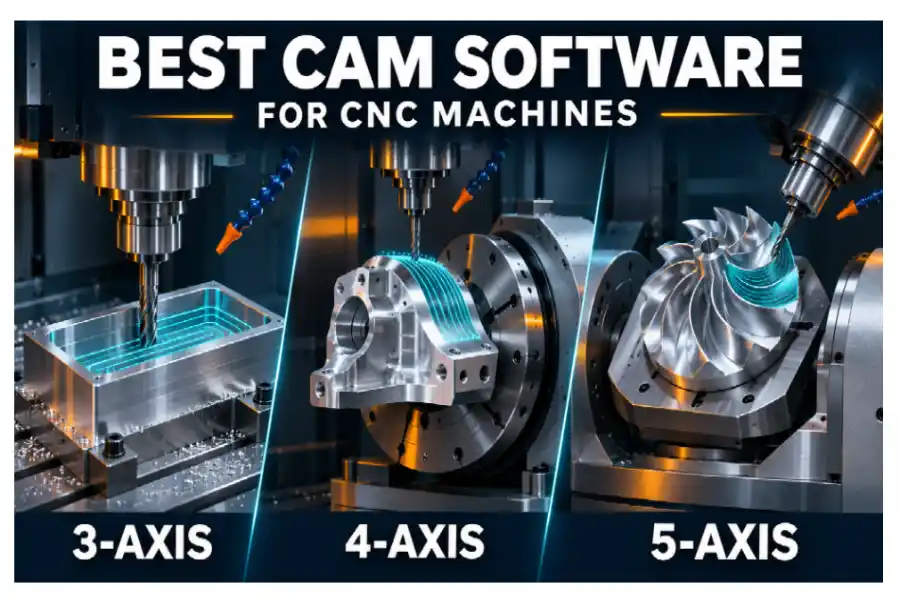
- 3-axis. The tool moves in X, Y and Z. CAM handles 2.5D work (pockets, profiles, holes) and 3D surfacing. Most packages do this well.
- 4-axis. A rotary axis turns the part, usually around X. CAM must handle indexed work (rotate, lock, cut) and wrapped or simultaneous toolpaths around a cylinder.
- 5-axis. Two rotary axes tilt the tool or the part. There are two modes. 3+2 (positional) tilts the part to a fixed angle and then cuts as 3-axis. Simultaneous 5-axis moves all five axes at once.
At 5-axis, three features matter more than anything else:
- Collision checking for the tool, holder, spindle head and fixture.
- Machine simulation using a model of your real machine, including its travel limits.
- A tested post-processor for your exact machine and controller.
A weak post-processor is the most common source of trouble. The toolpath can look perfect on screen and still crash on the machine if the post writes the rotary moves wrong.
Every CAM package also has hidden features, such as settings and shortcuts most users never open, so ask the vendor to show you a few during a trial. They often cut programming time more than a new toolpath strategy does.
Buy software, or send the part out?
Not every shop needs multi-axis CAM. Simultaneous 5-axis software takes months to learn well. The machine itself needs skilled setup and maintenance. If you only see a few multi-axis parts a year, outsourcing them is often the better call.
Signs it makes sense to outsource:
- The part needs 4- or 5-axis work, but most of your jobs are 3-axis.
- You need a prototype or a short run before you commit to your own setup.
- The drawing calls for tight tolerances, such as ±0.025 mm, on angled features you cannot inspect in-house.
- A production order needs a process capability target, often Cpk 1.33 or higher, and you have no data to prove it.
If you are new to rotary axes, learn the machine types before you choose a path. A good place to start is XTJ CNC axis machining, which explains what X, Y, Z, A, B and C mean, and how 3+2, 4+1 and simultaneous 5-axis machines differ. XTJ CNC was founded in 2005 and is based in Shenzhen. It machines parts from single prototypes to production runs and works from STEP or IGES files.
If you plan to program in-house, read on.
What to check before you buy CAM software
Use this list when you run a trial.
- Post-processor support. Ask the vendor or reseller for a tested post for your machine and controller. Get it in writing before you buy.
- Simulation level. Toolpath simulation shows the cutter. Machine simulation shows the whole machine. G-code simulation checks the code your post-processor writes. Multi-axis work needs the last two.
- CAD link. Some CAM runs inside your CAD system, for example inside SOLIDWORKS. Others are standalone. Integrated CAM updates toolpaths when the model changes. Clean models also save time downstream, so it pays to know the AutoCAD software commands if that is where your drawings start.
- Roughing strategies. Look for adaptive or high-efficiency roughing. These keep the tool load constant and shorten cycle times in hard materials.
- Tool library. Check that it stores holders as well as cutters. Collision checks need holder geometry.
- Training and local support. A reseller who can fix a post on a Friday afternoon is worth a lot.
- License model. Subscription, perpetual, or modular add-ons. Many products sell 5-axis as a separate module.
Best CAM software by axis count
Hobby and light 3-axis routers
Vectric (VCarve and Aspire). Vectric’s software is popular with sign makers, woodworkers and small router shops. It handles 2D and 2.5D work, V-carving and 3D relief carving. Many makers sculpt their reliefs in a mesh modeler first, and learning Blender keyboard shortcuts makes that step much faster. The higher tiers add toolpaths for a rotary axis, used for wrapped work such as turned table legs. It is not built for tight-tolerance metal parts.
Carbide Create. Carbide 3D makes Carbide Create for its Shapeoko and Nomad machines. It covers 2D and 2.5D design and toolpaths. It is simple to learn. It suits beginners who want a first part on the machine the same day.
3-axis and 4-axis production work
Autodesk Fusion. Fusion combines CAD, CAM and simulation in one cloud-connected product. It covers 2.5D, 3D, 4-axis and 3+2 positional work. Adaptive clearing is part of the standard toolset. Most simultaneous multi-axis strategies come with an extension. Autodesk keeps a large online post-processor library. Fusion is a common choice for small shops, startups and engineering teams that also design the parts.
Mastercam. Mastercam is one of the most widely used CAM systems in job shops. It has products for mill, lathe, mill-turn and router. Its high-efficiency roughing toolpaths are well known for steady, heavy cuts. Simultaneous multi-axis work is an add-on. Because so many shops use it, trained programmers and posts are easy to find.
SolidCAM. SolidCAM runs inside SOLIDWORKS. A version called InventorCAM runs inside Autodesk Inventor. Its iMachining roughing adjusts feeds to keep the tool load steady. It also offers modules for simultaneous 5-axis and mill-turn. It suits shops that already design in SOLIDWORKS.
5-axis and multi-tasking machines
hyperMILL. hyperMILL, from OPEN MIND Technologies, is known for 5-axis milling. It has dedicated packages for parts such as impellers, tubes and complex molds. It runs inside SOLIDWORKS or Autodesk Inventor, or in OPEN MIND’s own hyperCAD-S. Automatic collision avoidance is a core feature.
Siemens NX CAM. NX CAM is part of the Siemens NX product family. It handles everything from 2.5D to simultaneous 5-axis and mill-turn. Its machine simulation can be driven by the posted G-code. It connects to Siemens Teamcenter for data management. It is common at larger manufacturers. Expect a steep learning curve.
ESPRIT. ESPRIT, now part of Hexagon, is strong on mill-turn, Swiss-type lathes and multi-tasking machines. It builds programs around a model of the specific machine. Shops with B-axis turn-mill centers often choose it for that reason.
Many shops also add a separate verification tool such as VERICUT. It simulates the posted G-code on a model of the machine before anything runs.
Comparison table
| Software | Best fit | Axis range | CAD link | Learning curve |
|---|---|---|---|---|
| Carbide Create | Hobby routers | 2D and 2.5D | Basic design tools included | Easy |
| Vectric VCarve / Aspire | Signs, woodwork, routers | 2.5D, 3D relief, rotary wrapping | Design tools included | Easy to moderate |
| Autodesk Fusion | Small shops, design teams | 2.5D to 5-axis (simultaneous via extension) | Integrated CAD | Moderate |
| Mastercam | Job shops | 2.5D to 5-axis, mill-turn | Standalone or SOLIDWORKS add-in | Moderate |
| SolidCAM | SOLIDWORKS users | 2.5D to 5-axis, mill-turn | Inside SOLIDWORKS or Inventor | Moderate |
| hyperMILL | Complex 5-axis parts | 3-axis to 5-axis | SOLIDWORKS, Inventor or hyperCAD-S | Moderate to steep |
| Siemens NX CAM | Large manufacturers | 2.5D to 5-axis, mill-turn | Inside NX | Steep |
| ESPRIT | Mill-turn and Swiss-type | Multi-tasking, 5-axis | Standalone | Moderate to steep |
How to choose a package
- List your machines and their controllers.
- Pick two or three candidates from the table.
- Ask each vendor to program one of your real parts and post it for your machine.
- Run the code in simulation. Then dry-run it on the machine, above the part.
- Choose the package your programmers use fastest, with the fewest hand edits to the G-code. Hours saved each week matter more than the license price.
Heavy simulations can strain a workstation. If the software freezes mid-run, the Task Manager keyboard shortcut shows what is eating your memory, and Ctrl Win Shift B restarts a glitching graphics driver without closing your work.
FAQs
Do I need 5-axis CAM for 3+2 work?
You need CAM that supports positional 3+2 toolpaths. Many mid-range packages include this. A simultaneous 5-axis module is only needed when all axes must move together, for example on blades or smooth contoured surfaces.
Can I use 3-axis CAM on a 4-axis machine?
Yes, for indexed work. You rotate the part, lock it, and run a separate 3-axis program for each face. Wrapped or simultaneous 4-axis cuts need CAM with rotary support.
What causes most multi-axis crashes?
Usually a post-processor that does not match the machine, or a holder or fixture missing from the simulation. Simulate the posted G-code, not just the toolpath.
Is hobby CAM good enough for metal parts?
For simple 2.5D parts on a rigid machine, often yes. For tight-tolerance 3D or multi-axis metal parts, use a production package with machine simulation.
Quick picks
- For a hobby or sign router, start with Carbide Create or Vectric.
- For 3-axis and 4-axis production, Fusion, Mastercam and SolidCAM are the usual shortlist.
- For serious 5-axis and mill-turn work, look at hyperMILL, Siemens NX CAM and ESPRIT.
- Whatever you choose, the post-processor and the simulation matter more than the feature list.
- If multi-axis parts are rare for you, outsourcing them is often faster than building the skills in-house.