Does Changing Minecraft Difficulty Enable Cheats?
No, changing Minecraft difficulty does not enable cheats. These are two separate settings, and Mojang built them to work on their own. You can switch from Easy to Hard without turning cheats on, and you can turn cheats on without touching the difficulty at all.
A lot of players mix these two settings up because they sit close to each other in the world menu. This article breaks down what each setting really does, why the confusion happens, and how to change both settings the right way in Java Edition and Bedrock Edition.
What Difficulty Actually Controls in Minecraft?
Difficulty tells the game how tough your world should feel. Minecraft gives you four choices:
- Peaceful: No hostile mobs spawn, and your hunger bar stays full.
- Easy: Mobs spawn but deal less damage, and you can’t starve to death.
- Normal: The standard mob damage and hunger rules apply.
- Hard: Mobs hit harder, hunger can kill you, and some mobs get extra abilities, like zombies breaking down doors.
That’s all difficulty does. It changes mob damage, mob spawning, and hunger. It has nothing to do with commands, creative mode, or any other cheat-only tool.
What Cheats Actually Do in Minecraft
Cheats are a different setting that gives you access to commands and features you can’t normally use in survival mode. Once cheats are on, you can:
- Type slash commands like /gamemode, /tp, or /give.
- Use command blocks.
- Switch between survival and creative mode from the pause menu.
- Change the time of day or weather instantly.
Cheats have to be turned on in one of three ways: when you first create the world, through the “Open to LAN” screen, or in the world options screen if the option isn’t locked.
Why People Think Difficulty and Cheats Are Linked
The confusion comes from a few places. First, both settings live in the same “Game” or “World Options” menu, so players assume changing one affects the other. Second, older versions of Bedrock Edition had a bug where players couldn’t change difficulty from the settings menu unless cheats were already on. Mojang fixed that bug years ago, but old forum posts and videos about it still show up in search results today. Third, Hardcore mode locks difficulty to Hard no matter what, and that lock can feel connected to cheats even though it isn’t.
Difficulty and Cheats on Java Edition
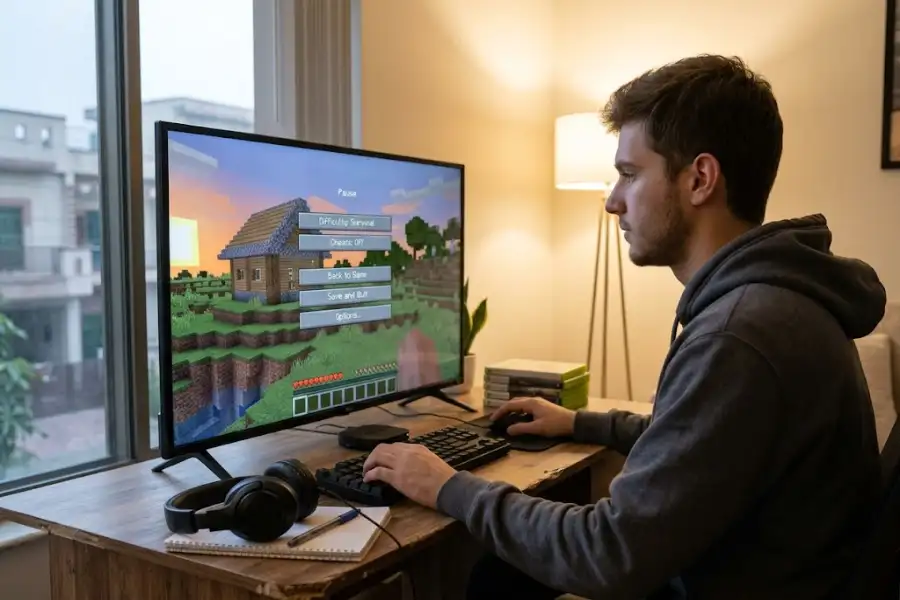
On Java Edition, you can open the pause menu, go to Options, and change difficulty in a regular survival world without needing cheats. The only time you can’t change it is in Hardcore mode, where difficulty stays locked to Hard.
Turning cheats on works differently. If you didn’t turn cheats on when you created the world, you have two options. You can open the world to LAN through the pause menu and set “Allow Cheats” to ON, which works for that play session. Or, if the “Allow Cheats” toggle in the world options screen isn’t grayed out, you can turn it on there directly.
Difficulty and Cheats on Bedrock Edition
Bedrock Edition (used on mobile, consoles, and Windows) handles this the same way today. You can change difficulty from the pause menu without needing cheats, as long as difficulty isn’t locked and you aren’t in Hardcore mode. Cheats have their own switch in the world settings, separate from the difficulty slider.
If you locked difficulty when you created the world, using the padlock icon, you won’t be able to change it later, even with cheats on. That lock has to be set before you create the world, so check it carefully during setup.
The Hardcore Mode Exception
Hardcore mode is the one place where difficulty and cheats really do connect. Hardcore worlds are always set to Hard difficulty, and the game won’t let you change that through normal menus, cheats or not. If you die once in Hardcore mode, you’re kicked out of the world for good. Some players use third-party mods to allow difficulty changes in Hardcore worlds, but that isn’t something Minecraft supports out of the game itself, and it usually turns off any of the game’s own scoring or leaderboard features tied to that world.
How to Change Difficulty the Right Way
- Open your world and press Escape (or the pause button on console).
- Go to Options.
- Find the Difficulty dropdown or slider.
- Pick Peaceful, Easy, Normal, or Hard.
- Close the menu. The change applies right away.
If the option looks grayed out, check whether you’re in Hardcore mode or whether difficulty was locked when the world was made.
How to Turn Cheats On
- Open your world and press Escape.
- Select “Open to LAN” (Java) or check the world settings (Bedrock).
- Set “Allow Cheats” to ON.
- Start the LAN world, or save the setting change.
- Open chat and type a command, such as /gamemode creative, to confirm cheats are working.
Remember that this only affects that world. If you close and reopen it, you may need to repeat these steps unless you saved the setting permanently in the world options.
Will Turning On Cheats Affect Your Achievements?
Yes. Turning cheats on in a world disables achievements (called “Trophies” on some platforms) for that world going forward. Minecraft does this so players can’t use commands to fake progress toward an achievement. If earning achievements matters to you, keep cheats off and just change your difficulty setting instead, since difficulty changes never affect achievement tracking.
Quick Comparison: Difficulty vs Cheats
| Setting | What It Controls | Affects Achievements? | Needs the Other Setting? |
|---|---|---|---|
| Difficulty | Mob damage, spawning, hunger | No | No |
| Cheats | Commands, creative access, command blocks | Yes | No |
Frequently Asked Questions
Can I change difficulty without turning cheats on?
Yes, in a regular survival world (not Hardcore, and not locked), you can change difficulty at any time from the Options menu, with cheats off.
Does Hardcore mode always block difficulty changes?
Yes. Hardcore worlds stay on Hard difficulty, and the game blocks changes to it through normal menus.
Do cheats turn off automatically when I lower the difficulty?
No. Cheats stay on or off based only on the cheats setting. Lowering or raising difficulty doesn’t touch it.
Will using cheats delete my saved progress?
No, turning cheats on won’t erase your world or items. It only stops new achievements from unlocking for that save file (Xbox and PlayStation platforms may count trophies differently, so check your platform’s rules if you’re unsure).
Can server admins control both settings separately?
Yes. On a Minecraft server, “difficulty” and “allow-cheats” are two separate lines in the server.properties file, and changing one has no effect on the other.
Final Thoughts
Changing your Minecraft difficulty will never turn cheats on by itself, and turning cheats on will never change your difficulty by itself. They are two separate switches that happen to live near each other in the menu. Once you know where each one is, and what Hardcore mode does differently, you can set up your world the way you like, whether that’s a peaceful creative build using a Minecraft circle calculator to plan round builds, or a tough survival run with cheats off and achievements on.
If you enjoy testing shortcuts and secret codes in games beyond Minecraft, the number-based cheat systems in older titles work in a very different way. Classic console cheats, like the ones players still look up for San Andreas on Xbox 360 or handheld favorites such as Pokemon Emerald, are typed once and stay active, unlike Minecraft’s on/off cheats toggle. And if you play on public Minecraft servers, secret codes work differently again, similar to the ones used on Minigame Box PvP servers, which are set up by server owners rather than built into the base game.