32Accessibility at Scale: Building WCAG 2.2 Compliant Unclaimed Property Search Platforms for All Americans
Access to digital is not a luxury option, but a basic civil right. To the 61 million Americans who have a disability, a government website is in many cases the sole entry point to their vital services. With billions of dollars waiting to be reclaimed by their owners, an interface that cannot be accessed is more than frustrating in the context of unclaimed property it disenfranchises a large segment of the population.
With the publication of the Web Content Accessibility Guidelines (WCAG) 2.2 comes a fresh start in the field of inclusive design. These standards go beyond simple compliance to address the subtle needs of users with cognitive, motor and visual disabilities. Government programmers can make these platforms accessible to all citizens equally by adopting a shift-left strategy of including accessibility as the first line of code. This article offers a step-by-step roadmap of how to comply with WCAG 2.2, and it shows how inclusive design will eventually result in a sturdier and more usable experience for everyone.
Accessibility Requirements and Legal Landscape
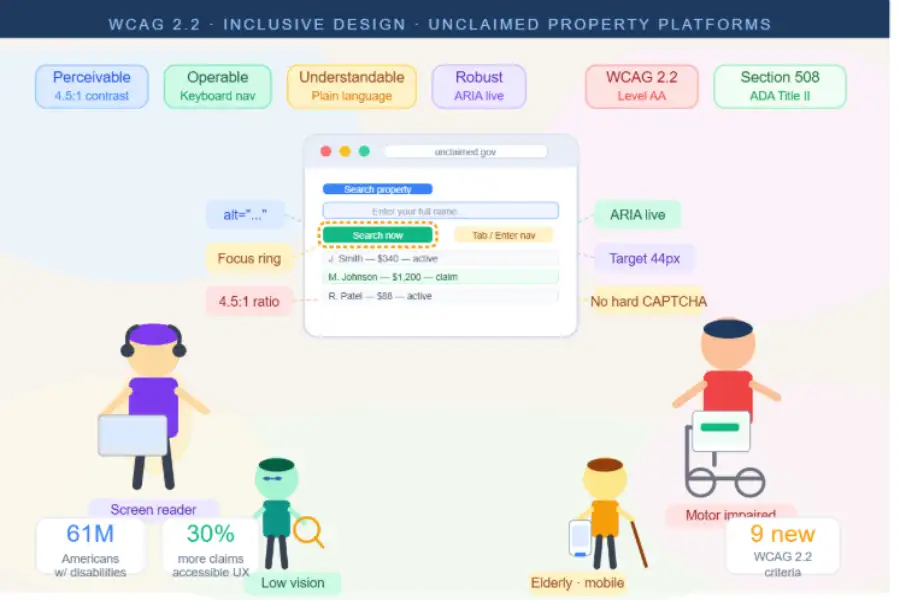
The legal case for accessibility is laid down by Section 508 of the Rehabilitation Act and ADA Title II, which requires state and local government services to be available to individuals with disabilities. Although WCAG 2.1 Level AA has been the standard, there is a shift to WCAG 2.2, and nine new success criteria have been introduced, which deal with newer web interactions.
WCAG 2.2 adds important changes, including Accessible Authentication, which requires that users not be forced to pass complex cognitive tests (such as hard CAPTCHAs) to log in. It also emphasizes Target Size Minimums, requiring interactive elements to be large enough for those with reduced fine motor skills to activate. According to the W3C Web Accessibility Initiative (WAI), these standards are founded on four principles known as POUR: content must be perceivable, operable, understandable, and reliable across browsers and assistive technology. Failing to satisfy these standards not only hinders citizen service, but also puts agencies at a high risk of litigation in an increasingly busy regulatory landscape.
Implementing WCAG 2.2 in Code
Achieving compliance requires a blend of semantic markup, keyboard operability, and screen reader support.
Semantic HTML and Keyboard Navigation
Semantic HTML is the basis of an accessible site. Applying the correct heading hierarchies (h1-h6) and landmark areas (main, nav, footer) lets screen reader users jump to the right area as fast as possible. Moreover, all interactive components should be reachable through the keyboard alone. This involves keeping a reasonable tab order and keeping the focus indicator (the visual outline of whichever element is currently selected) very visible, in line with the new Focus Appearance standards.
Plenty of power users already live on the keyboard, racing through their inbox with Gmail keyboard shortcuts, and for many disabled users that same keyboard is not a preference but the only way in. Every form, menu, and button on your portal should respond to it just as smoothly.
Screen Reader and Visual Support
Developers must go beyond simple alt text. Although informative images must have descriptions, decorative features should be hidden from assistive tech with aria-hidden="true". ARIA live regions are also necessary to inform users of changes without making them lose focus, for example when the number of search results changes on the fly. Visually, a contrast ratio of 4.5:1 for text and 3:1 for UI components helps low-vision users read the text and use the interface successfully. Resources from WebAIM provide excellent tools for verifying these contrast ratios during development.
Before you ship, switch on a screen reader and listen to your own pages. Macs include VoiceOver, which toggles with Command+F5 (one of many Mac keyboard shortcuts worth memorizing), and hearing your page read aloud exposes gaps in minutes.
Building Accessible Search and Claim Flows
The core utility of an unclaimed property site lies in its search and submission pipeline. If these flows are not accessible, the entire platform fails its mission.
The Search Interface
Search inputs must be clearly labeled and support autocomplete attributes to help users with cognitive disabilities. The number of properties found should be announced when results load. A publicly available services platform should let users handle every operation, from the initial search through claim filing, using only keyboard navigation, screen readers, or other input devices. This also means making sure that sortable table columns and filter facets can be used fully without a mouse.
Accessible Claim Submissions
Claim forms usually involve uploading sensitive data and documents. To comply with WCAG 2.2, forms should provide Redundant Entry protection so users do not have to re-enter data they already submitted during the same session. Error handling is also crucial; errors should be identified in text and offer suggestions for correction. For document uploads, use a regular file input alongside any drag-and-drop areas, since drag-and-drop might not always be an option for individuals with motor disabilities. For full patterns, the W3C’s ARIA Authoring Practices documentation offers tested templates for these complex components.
Testing and Quality Assurance
Compliance cannot be verified by software scanners alone. Tools such as axe DevTools or Lighthouse are fantastic at catching about 30-40 percent of the problems, but the only way to ensure an experience is truly inclusive is to test it by hand.
A Multi-Layered Testing Strategy
- Tool-Based Scans: Add accessibility tests to the CI/CD pipeline to catch semantic errors early, before they turn into expensive rework.
- Manual Keyboard and Screen Reader Audits: Work your way through the complete claim process using only a keyboard and at least one screen reader (NVDA, JAWS, or VoiceOver). On Windows, Narrator is another option, and Ctrl + Windows key + Enter switches it on (one more of those quiet Windows 11 tips and tricks most people never use).
- User Testing: The gold standard is testing with people who have disabilities. They can provide feedback on cognitive load and everyday usability that no tool can replicate.
- VPAT Documentation: Keep a Voluntary Product Accessibility Template (VPAT) on file to record conformance and keep procurement and audits transparent.
Organizational Accessibility Culture
Code fixes cannot last without an organization that adopts an inclusive culture. It starts with education at every position: designers need to know how to use high-contrast palettes, content authors need to know how to write in plain language, and developers need to be familiar with ARIA patterns.
Including accessibility in the “Definition of Done” guarantees that no feature is released without complying with the WCAG standards. To sustain these standards in the long run, it may be appropriate to appoint an accessibility champion or lead. By creating an accessible design system of pre-vetted components, agencies can scale accessibility across more portals with little friction, saving time on every new project and making sure every new digital service is born inclusive.
Conclusion
Accessibility is not a checklist but a process that is constantly being followed towards a more equal digital society. Establishing a portal of unclaimed properties which will adhere to the WCAG 2.2 standards is a powerful statement of the commitment of the governments to all people in the nation. Being accessible does not only benefit persons who have permanent disability, but also benefits the elderly, individuals who might be using their mobile devices during the day and those who might be experiencing temporary injuries. Many of them already lean on accessibility settings tucked away in their phones, the kind of options covered in our iPhone hidden features article. Above all, it guarantees that all Americans have equal chance to get their money back. Take the first steps towards accessibility by beginning to think through the lens of inclusive design at the very beginning; the outcome will be a more inclusive, stronger platform.