How To Design Character Sticker Sets That Feel Natural In Online Conversations
Character stickers work best when they feel like a natural extension of the way people already talk online. Instead of treating every design as a standalone illustration, create a small visual language that helps users greet, react, encourage, celebrate, or gently say “not now.” An AI sticker generator can help explore early concepts, but the final set still needs intentional character design and real-world testing.
The goal is not simply to make stickers look cute or polished. Each one should communicate a clear feeling or response quickly, even when it appears in a crowded chat thread at a small size. A consistent character, an appropriate tone, and a useful range of reactions turn a collection of images into a set people will use again and again.
1. Why Sticker Sets Work In Digital Conversations
Text can communicate information, but it does not always communicate tone. Stickers add expression, posture, visual humor, and a sense of personality to a reply. Unlike a reaction button, a character can look relieved, embarrassed, sleepy, proud, or overwhelmed. The basic idea behind messaging stickers is that illustrated characters can represent emotions and actions in chat-based communication. Chat platforms clearly know how much personality matters, which is why apps like Discord tuck playful extras into their interface, as covered in Discord Easter Eggs.
A complete set is more useful than one attractive image because conversations repeat familiar moments. People need ways to say hello, thank you, “I agree,” “I am thinking,” and “good night,” not only dramatic celebrations or jokes.
2. Start With A Clear Purpose
Before sketching, define who will use the pack and where they will use it. A sticker set for a gaming community may be energetic and competitive, while one for a study group may need supportive, focused, and deadline-related reactions. Choose a tone, list frequent conversation moments, and decide whether the set serves friends, customers, followers, or a private group.
Set boundaries early. Decide the color approach, language level, text usage, visual style, and target platform. These choices prevent the pack from drifting into a random mixture of ideas, and they save a lot of redrawing time later.
3. Build A Simple Character System
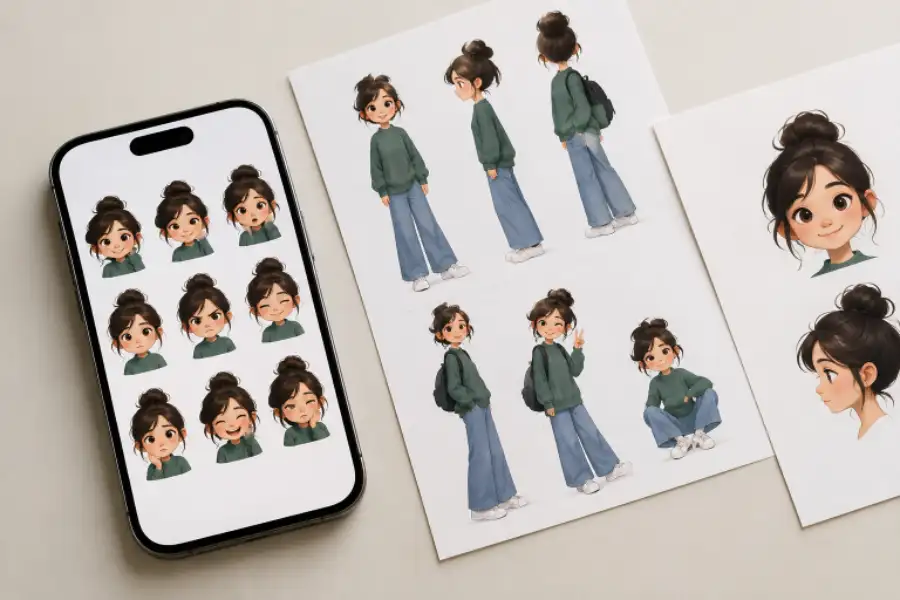
A sticker character needs a few traits people can recognize instantly. This may be a rounded body shape, distinct ears, a signature hairstyle, a scarf, or a particular color combination. Keep the design simple enough to repeat in many poses without losing its identity.
Create a short reference sheet with the character’s proportions, line weight, palette, facial features, accessories, and basic expressions. This sheet keeps later stickers consistent, especially if several people contribute to the artwork.
4. Choose Reactions People Need
Build the first pack around common conversational needs rather than decorative concepts. Start with a solid foundation:
- Hello, goodbye, good morning, and good night.
- Thank you, sorry, congratulations, and encouragement.
- Yes, no, agreement, confusion, and “I am not sure.”
- Excitement, disappointment, celebration, and relief.
- Waiting, thinking, working, eating, resting, or being busy.
Keep in mind that most people reach stickers and emoji through a quick shortcut, such as the Windows key plus the period key on a PC or Control + Command + Space on a Mac. If your set is easy to find and use in a couple of keystrokes, it will earn more daily use. You can find more of these time savers in Windows 11 Tips and Tricks and Mac Keyboard Shortcuts.
Make Each Reaction Visually Distinct
Use more than facial expression. A raised hand can signal a greeting, slumped shoulders can suggest disappointment, and a jumping pose can communicate excitement. Keep symbols secondary. Hearts, sparkles, sweat drops, or small motion lines can reinforce meaning, but the character’s pose should carry the message on its own.
5. Design For Small Screens
Design at a large working size, then regularly check the sticker at the smallest size users are likely to see. On a desktop, a quick way to preview this is to zoom your browser out with Ctrl and the minus key (Cmd and minus on a Mac) until the sticker is about phone-sized. Fine textures, thin outlines, tiny lettering, and distant props often disappear on a phone. Keep the main action near the center, leave breathing room around the character, and use enough contrast to separate it from both light and dark chat backgrounds.
Clear outer shapes matter. If a sticker still makes sense as a small silhouette, it has a stronger chance of being recognized quickly during a fast-moving conversation.
6. Keep The Full Set Consistent
A cohesive set feels dependable because users learn its visual rules. Maintain the same color palette, line thickness, shadow treatment, border style, and character proportions. Review all stickers together, not one at a time. A design that looks good alone may feel too dark, too detailed, or oddly scaled beside the rest.
A cohesive collection looks like one character responding to different situations. A scattered collection looks like unrelated drawings that happen to use the same mascot.
7. Test The Set In Real Conversations
Ask a small group from the intended audience to use the pack naturally for several days. Notice which stickers they reach for first, which ones they ignore, and which meanings require explanation. Research on online group discussions found that participants could interpret the same sticker differently, so feedback is especially important for sarcasm, gestures, and subtle emotions.
Testing should also consider cultural context. A hand sign, color association, or facial expression that feels obvious to one audience may have a different meaning to another.
8. Avoid Common Sticker Design Mistakes
- Making dozens of stickers before defining the audience and purpose.
- Using busy backgrounds that compete with the character.
- Relying on text that becomes unreadable at small sizes.
- Giving every sticker nearly the same facial expression or pose.
- Changing colors, proportions, or line styles throughout the set.
- Assuming a gesture will mean the same thing to every user.
9. Prepare Files For Different Platforms
Check the chosen platform’s current file, dimension, animation, and size requirements before exporting. Use transparent backgrounds when supported, inspect edges for unwanted halos, and organize files with clear names. Photoshop has a lesser-known cleanup option for those halos, the Defringe command under Layer, then Matting, which can fix stubborn edges in seconds. More tricks like it are collected in Photoshop Hidden Features. Keep editable source files, plus a cover image that represents the character and tone of the full pack.
10. Use A Simple Final Checklist
- Does every sticker serve a clear conversational purpose?
- Can someone understand its main emotion in about a second?
- Does the character remain recognizable across the full set?
- Is each design readable on a small screen and in dark mode?
- Does the pack include everyday replies as well as memorable reactions?
- Have intended users tested the stickers in actual conversations?
- Are the exported files ready for the destination platform?
Conclusion
A strong character sticker set is a useful communication tool rather than a group of appealing drawings. Start with real conversation needs, build a simple character system, prioritize small-screen clarity, and refine the work through testing. When every sticker has a purpose, and the full collection feels consistent, users can express themselves with less effort and more personality.