Models Have Been Hidden Due to Your Settings.: Quick Fix
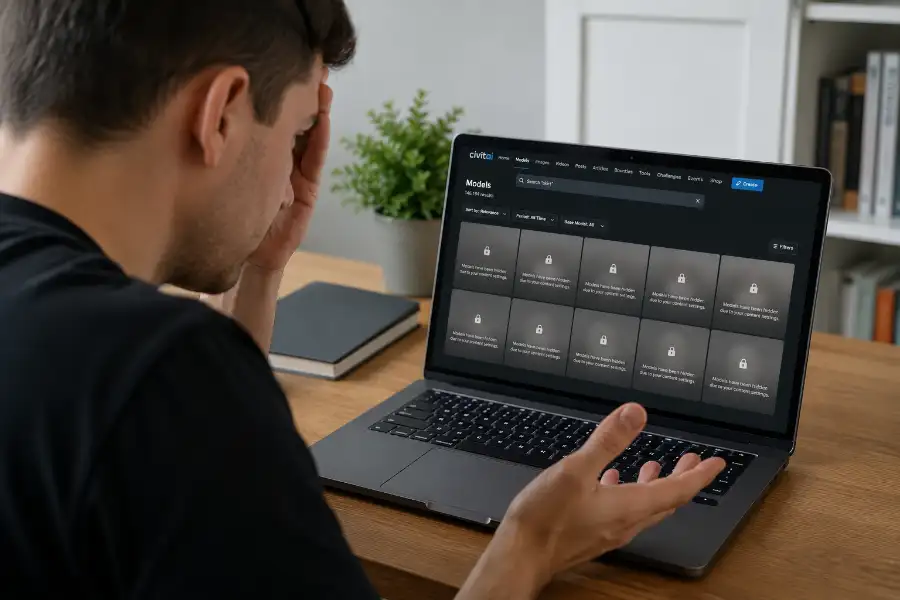
You search for a model on Civitai. You type in your term. Then a strange gray message shows up instead of a picture: “1 models have been hidden due to your settings.” No image. No name. No clear reason.
While it feels like a glitch, understanding this hidden software egg or account restriction is key if you already checked your filters and turned them all off. But this message is not random. It has real causes. Most of them have real fixes. This guide walks you through why Civitai hides models. It also shows you how to fix it in a few clicks, and when a model is gone for good no matter what you try.
What Does This Hidden Models Message Mean?
The message means Civitai found a model that matches your search. But it will not show it to you. The block comes from one of two places. It is either your own account settings, or a rule that Civitai set for everyone.
Think of it like a library. The book you want is on the shelf list. But the librarian will not hand it over yet. Maybe you need the right card first. Maybe the book is locked in a back room for other reasons. That is what this message really means. Civitai is saying, “we have it, but you can’t see it right now.”
6 Reasons a Model Gets Hidden
1. Your mature content filter is turned off
This is the most common reason. Civitai sorts every model into a content level. The levels run from PG all the way up to XXX. If “Enable mature content” is switched off in your account, any model above PG stays hidden. This happens even to models that are not truly adult in nature. Many creators mark their work as mature just to stay safe.
2. The creator marked the model as “mature”
Creators can flag their own upload as mature. Once they do, the model drops out of the PG and PG-13 feeds. This happens no matter what the sample pictures look like. The rule exists so nothing slips through by accident.
3. The model is waiting for review
New uploads often sit in a queue first. So do models that got reported by other users. A real person checks each one by hand. Until that check is done, the model stays hidden from search. This can take a few hours. Sometimes it takes a few days.
4. The model was deleted or made private
Sometimes the model is just not there anymore. The creator may have removed it. They may have made it private. Or Civitai staff may have pulled it for breaking a rule. Your settings have nothing to do with this one. The model is simply gone.
5. You have hidden tags or blocked creators
Did you ever hide a tag or block a user in the past? Civitai remembers that choice. Any model with that tag stays out of your results. So does any model from that creator. This happens even if you forgot you set the filter.
6. A short-term site bug
On rare days, Civitai’s own search tool has had bugs. These bugs hid results even for users with every filter turned off. Civitai usually fixes these fast once people report them. If none of the reasons above fit your case, bad timing might be the real answer.
How to Fix It: Step by Step
Work through these steps in order. Most people find their fix in the first three.
- Click your profile picture in the top right corner. Then open your account settings.
- Scroll down to the section called Content Moderation.
- Turn on “Enable mature content.” Without this, you will never see anything above PG.
- Turn on “Blur mature content” if you want a warning first, instead of the image showing right away.
- Find the browsing level menu. It shows up as a small eye icon near the top of the site. Raise it past PG-13 if you want R, X, or XXX results too.
- Open “my filters.” Look for any hidden tags or blocked creators from the past. Remove the ones you no longer want.
- Log out, then log back in. Or clear your browser cache. An old setting may be stuck.
- Search again. If the model still will not show, it is likely under review, private, or deleted. Settings alone cannot fix that.
How to Check Your List of Hidden Models
Civitai keeps a page just for models that are hidden from your account. Try adding ?hidden=true to the end of the site’s models page address. This should pull up that list. It will not tell you the exact reason for each one. But it lets you scan through them instead of guessing search by search.
When Nothing You Do Will Fix It
Sometimes there really is no fix. And that is okay. A model stays hidden no matter what your settings say when:
- It was deleted by the creator or removed by Civitai staff
- It is still sitting in the review queue
- It was tied to a real person’s likeness and pulled under Civitai’s policy on that topic
- The uploader made it private and never posted it again
In these cases, your filters will not bring it back. Try searching for a similar model from a different creator instead. You can also check the creator’s page directly. They may have posted it again under a new name. Civitai’s policy page covers the current rules on what gets pulled and why.
Quick Checklist Before You Give Up
- Mature content is turned on in your account settings
- Your browsing level includes R, X, or XXX if you need them
- No hidden tags or blocked creators are quietly filtering results
- You tried logging out and back in
- You checked the creator’s page directly, in case the model moved
Frequently Asked Questions
Why do I still see this message with every filter off?
This usually means the model itself is private, deleted, or still under review. It is not always about your account, as learning how to see hidden games on steam proves that overlooked client filters can quietly remove content you already own from your active view.
How many models can be hidden at once?
There is no set limit. The number in the message, like “1 models” or “12 models,” just shows how many results your search would return if the block were not there.
Does turning on mature content show everything?
Not always. It opens up the R, X, and XXX levels. But models that are deleted, private, or under review stay hidden no matter what level you allow.
Is this message a sign my account got flagged?
No. It is a normal part of how Civitai sorts its content. Seeing it does not mean anything is wrong with your account.
Can I ask a moderator to unhide a model for me?
You can contact Civitai support. But moderators rarely skip the review process just because you asked. If a model was removed for breaking a rule, it will not come back.
The next time this message pops up, you will know where to look first. Check your content settings. Check your hidden tags. If neither one fixes it, you now know the model is probably gone, not glitching.