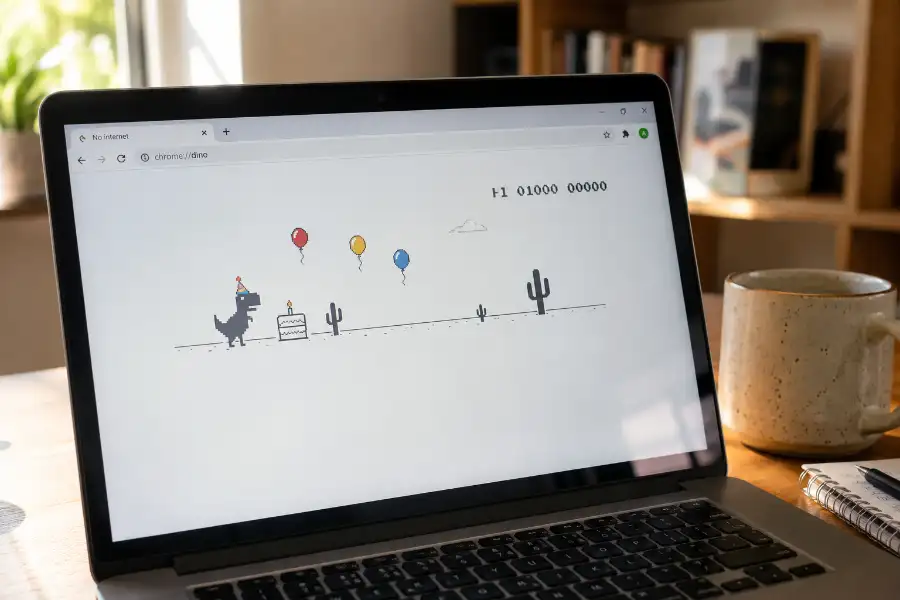
Chrome Dino Game Birthday Mode: How to Play It Today
You know that little dinosaur that shows up when your Wi-Fi dies? It turns out he throws a birthday party too. The Chrome Dino Game Birthday Mode is a hidden, festive version of the classic offline runner, and most people who have played the regular game for years have no idea it ever existed. If you love this game or just found out about the surprise, you are about to learn everything about it, including how to play it today.
What Is the Chrome Dino Game Birthday Mode?
The Chrome Dino Game Birthday Mode is a special version of Google Chrome’s famous offline T-Rex game. Instead of just jumping over cactus plants and ducking under flying pterodactyls, the dinosaur runs past a birthday cake. If it grabs the cake, something fun happens. A party hat pops onto its head, and balloons start floating in the sky behind it. The desert suddenly feels like a celebration instead of a lonely wasteland. It is a brilliant example of a hidden software egg that rewards curious users with an unexpected moment of fun.
This was not a permanent feature. It was a limited-time surprise that Google added for a very specific reason, and that reason is tied to the game’s own birthday.
How the Birthday Mode Started
The original Dino game was built in 2014 by a small team on Chrome’s design group. In September 2018, Chrome itself turned ten years old, and the Dino game turned four. To mark the moment, the Chrome team quietly added the birthday theme as an Easter egg inside the game.
One of the engineers behind it, Alan Bettes, explained that the update was:
a special anniversary edition with cake, balloons, and a fancy birthday hat.
Interestingly, the vanilla cake design was not random. Another team member, Edward Jung, is an amateur baker in real life, and he picked the cake flavor himself since the dinosaur would be “eating” it millions of times.
How the Birthday Mode Works
The mechanics stayed simple, which is part of why people loved it. Here is what changes during Birthday Mode:
- A birthday cake appears on the ground along with the usual cactus obstacles.
- If the T-Rex touches the cake, it instantly gets a party hat.
- Balloons drift across the sky in the background once the hat appears.
- The hat color changes depending on whether the game is in day mode or night mode.
- Players can also jump over the cake instead of grabbing it, since it is optional, not a required obstacle.
- The pterodactyl bird still appears, but in some versions of Birthday Mode it flies without needing to be ducked.
So the core gameplay barely changed. You still run, jump, and duck. The birthday theme was simply a layer of decoration on top of a game people already knew by heart.
Is the Birthday Mode Still Available in Chrome Today?
Here is the part that surprises most players: the official Birthday Mode was only active for about a month, through September 2018, to match Chrome’s actual birthday celebration. After that window closed, Chrome quietly switched back to the standard desert-and-cactus version, and Google never brought the birthday theme back as a regular part of the game.
If you open chrome://dino or trigger the game from the “No Internet” page today, you will get the regular T-Rex, not the birthday version.
How to Play the Birthday Edition Right Now
Even though Google removed it from Chrome itself, the good news is that fans preserved the birthday version so nobody has to miss out. Here is how to find and play it:
- Search for a preserved or mirrored version of the Chrome Dino Birthday Edition online, since a few fan sites archived the exact code.
- Open the page in any browser, since these mirrors work on their own and are not tied to Chrome alone.
- Press the Space bar, the Up arrow, or tap the screen on mobile to start running.
- Watch for the birthday cake and run into it to trigger the party hat and balloons.
- Press Down to duck under any obstacles, though if the survival speed gets too intense, you can always apply some standard chrome dino game cheats to lock in an unbeatable score.
No downloads, no extensions, and no special settings are needed. It runs directly in the browser, the same way it did back in 2018.
Birthday Mode vs Other Dino Game Editions
The birthday theme was not the only special version Google made for the Dino game. Over the years, a few other editions showed up, and it helps to know how they compare.
- Birthday Mode (2018): Cake, party hat, and balloons to mark Chrome’s tenth birthday.
- Olympics Mode (2020): Released for the Tokyo Olympics, this version turned the T-Rex into different athletes, including a swimmer, surfer, and hurdler, instead of the usual runner.
- Christmas Mode: A winter theme with snow and holiday colors, mostly found on fan-made mirror sites rather than official Chrome builds.
- Classic Mode: The plain black-and-white desert run that has been part of Chrome since 2014 and is still active today.
Out of all of these, Birthday Mode tends to get the most nostalgic reaction from long-time Chrome users, probably because it was the very first time Google decorated the game at all.
Fun Facts Most People Don’t Know
- The dinosaur has an official name. Its designer, Sebastien Gabriel, called it the “Lonely T-Rex.”
- The project’s internal codename during development was “Project Bolan,” a nod to Marc Bolan, singer of the band T. Rex.
- Google built a hard limit into the game so the score cannot climb forever. It caps out at roughly the same number of years the actual T-Rex species walked the Earth.
- By 2018, Google reported that people were playing the offline game around 270 million times a month, long before the birthday version even existed.
- A newer AI-powered version called GenDino briefly let players generate their own custom dino sprites. While that specific tool is gone, experimenting with a modern ai dinosaur game is still one of the best ways to watch a browser bot learn the patterns on its own.
Frequently Asked Questions
Can I still play the birthday edition on Chrome by default?
No. The official birthday theme was only live for about a month in September 2018. Chrome now shows the standard desert version whenever you go offline.
Do I need to be offline to play the birthday version?
Not if you are using a preserved mirror site. Those versions load directly in your browser and work whether you have internet access or not.
Does grabbing the cake give extra points?
No, the cake does not add to your score. It only changes the dinosaur’s appearance by adding the party hat and balloons.
Can I skip the cake if I don’t want the costume change?
Yes. The cake is treated as an optional pickup, similar to jumping over a cactus, so you can simply jump past it if you prefer the plain look.
Is the Birthday Mode the same on mobile and desktop?
The visuals are the same, but controls differ slightly. On desktop you use the Space bar or arrow keys, while on mobile you tap the screen to jump.
Final Thoughts
The Chrome Dino Game Birthday Mode is a small piece of internet history that most Chrome users scrolled right past without noticing. It only lived on official Chrome for a few weeks back in 2018, tucked inside a browser feature most people only see when their Wi-Fi fails. Thanks to fans who saved the code, though, the party hat, balloons, and birthday cake are still just a click away today. Next time your internet drops, you now know there is a much more festive version of that lonely dinosaur out there waiting to run.