

Google Maps Easter Eggs: 15+ Surprises You Need to Try Right Now (2026)
You probably use Google Maps every single day. Finding directions, checking traffic, looking up restaurants. But here is something most people never realize. Google Maps is packed with secret surprises, hidden jokes, and playful tricks that the developers tucked away just for fun.
These hidden gems are called “easter eggs,” and they turn a boring navigation tool into something way more entertaining. Some of them are so clever that even longtime Google fans have never spotted them.
I spent hours digging through every corner of Google Maps to find the best ones. Some are still active today, and some are legendary classics that changed how we think about digital maps forever. Let me walk you through all of them.
What Exactly Are Google Maps Easter Eggs?
Before we jump in, let me explain what an easter egg is. In the tech world, an easter egg is a hidden feature, joke, or surprise that developers hide inside software. You are not supposed to find it easily. Much like discovering a classic software egg, it is like a secret reward for curious people who love to dig around.
From clever Google Search Easter Eggs to hidden Android mini-games, Google is famous for hiding these little surprises across all its products. But Google Maps has some of the most creative and fun ones out there. They range from tiny costume changes on a little cartoon character to entire virtual tours of fictional places.
Now, let me show you the good stuff.
Pegman Easter Eggs: The Little Guy With a Big Wardrobe
You know that small orange figure in the bottom right corner of Google Maps on your computer? That little character is called Pegman. His job is simple. You drag him onto the map, and he drops you into Street View so you can see real photos of that location.
But here is the fun part. Pegman does not always look the same. Depending on where you drop him, he changes his outfit. And some of these costume changes are absolutely hilarious.

Loch Ness Monster Pegman
Search for “Loch Ness” in Google Maps on your desktop. Now pick up the Pegman icon. Instead of the usual orange figure, he turns into a cute little green Nessie wearing a tiny tartan hat. It is a playful nod to the famous Loch Ness Monster legend, and it always puts a smile on people’s faces.
Area 51 UFO Pegman
Type “Area 51” into Google Maps and grab the Pegman. He ditches his normal look and hops onto a flying saucer. It is Google’s cheeky way of poking fun at all the alien conspiracy theories surrounding the mysterious military base in Nevada.
Buckingham Palace Royal Pegman
Zoom into Buckingham Palace in London and pick up Pegman. He dresses up in royal attire, looking like a tiny version of the Queen. Some people call this version “Pegma’am,” which is hands down one of the best puns in all of Google.
Kennedy Space Center Astronaut Pegman
Navigate to the Kennedy Space Center in Florida and grab Pegman. He puts on a full astronaut suit, complete with a helmet. It is a sweet tribute to NASA and the history of space exploration at that location.
Legoland Lego Pegman
Head over to Legoland in California on Google Maps. Drop into Street View and Pegman turns into a tiny Lego minifigure. It fits perfectly with the theme of the location, and kids absolutely love finding this one.
The best part about Pegman easter eggs is that Google keeps adding new ones. He has also appeared as a snowman during winter holidays and even wore special outfits to celebrate Street View’s anniversary. So it is always worth checking what he looks like when you visit a new place on the map.
The “Swim Across the Ocean” Directions
This is one of the most legendary Google Maps easter eggs of all time. Back in earlier versions of Google Maps, if you asked for directions between two places separated by an ocean, something funny would happen.
For example, if you searched for directions from Paris to New York City, Google would give you normal driving directions to the coast of France. But then, right in the middle of the route, it would casually suggest: “Swim the Atlantic Ocean (3,500 miles).”
Just like that. As if swimming across the entire Atlantic Ocean was a perfectly normal step in your road trip. No big deal, right?
Google also had similar jokes for other ocean crossings. If you searched for directions from China to Japan, it would sometimes suggest taking a jet ski across the water. These quirky directions became viral sensations and are still some of the most talked about easter eggs in internet history.
The Lord of the Rings Walking Directions
This one is pure gold for movie fans. Back when Google Maps’ walking directions were still in beta testing, there was a brilliant hidden message waiting for Lord of the Rings lovers.
If you searched for walking directions from “The Shire” to “Mordor,” Google would calculate a route for you. But it came with a very special warning message: “Use caution. One does not simply walk into Mordor.”
That is, of course, the famous line from the movie spoken by Boromir. It became one of the biggest internet memes ever, and Google played right into it. This easter egg showed that the people building Google Maps were more than engineers. They were fans, just like the rest of us.
Travel by Dragon in Wales
Here is one that sounds made up, but it was completely real. If you searched for directions from Snowdon to the Brecon Beacons in Wales, Google Maps used to give you an extra travel option alongside driving, walking, and cycling.
That extra option? Travel by dragon.
According to Google, flying by dragon would get you there in about 21 minutes. Wales has a red dragon on its national flag, so this easter egg was a clever and charming nod to Welsh culture and mythology. It was one of those small details that made people fall in love with Google Maps even more.
Step Inside the TARDIS From Doctor Who
Doctor Who fans, this one is for you. If you search for “Earls Court Road Police Box” in Google Maps and drop into Street View, something magical happens. You can step inside the TARDIS.
Yes, seriously. You get a full 360 degree view of the inside of the Doctor’s famous time machine. It is way bigger on the inside, just like in the show. The level of detail is impressive, and it feels like you have walked right into the world of Doctor Who.
Finding the entrance can be a little tricky. You need to position Pegman just right, slightly to the left of the police box marker. But once you get in, it is totally worth the effort.
Walk Through Diagon Alley From Harry Potter
Harry Potter fans are not left out either. Google added the famous Diagon Alley to Google Maps, and you can walk through it in Street View. You can peek into the windows of shops like Slug and Jiggers Apothecary and Flourish and Blotts bookshop.
The images come from the Warner Bros Studio Tour in London, so you are seeing the actual movie sets. You might spot a few other tourists in the photos, but that just makes it feel more real.
You can also type “Fantastic Beasts, New York City” and drop Pegman onto the map. This takes you inside MACUSA, the Magical Congress of the United States of America from the Fantastic Beasts movies. You can look around the building and even visit The Blind Pig speakeasy.
Visit the International Space Station
This is not exactly a joke or a hidden gag, but it is one of the coolest things you can do on Google Maps. You can visit the International Space Station in Street View.
Back in 2017, astronaut Thomas Pesquet took special photos while he was aboard the ISS. NASA helped design a way to capture 360 degree images in zero gravity using DSLR cameras that were already on the station. Those images were stitched together back on Earth and added to Google Street View.
You can float through the different modules of the space station and even peek out from The Cupola on Google Street View, which is the small observation window where astronauts look down at Earth. It is an absolutely breathtaking experience, and it is completely free.
Google Moon: The Moon Is Made of Cheese
Google does more than map the Earth. It also maps the Moon. And naturally, they hid an easter egg up there too.
In the early days of Google Moon, if you zoomed all the way in to the closest level, the surface would change to show that the Moon was made of cheese. It was a playful reference to the old fairy tale that the Moon is a giant ball of cheese.
Google Moon also shows the locations of all the Apollo Moon landings. And if you read the FAQ section, it humorously mentions that by the year 2069, Google Local will support all lunar businesses and addresses. That is forward thinking on a whole new level.
The Brooklyn Navy Yard Stop Motion Adventure
This one is truly special because it was not made by Google at all. A mysterious group of artists called the “Loosi Ninjas” noticed that the Brooklyn Navy Yard in New York was one of the few public spaces never visited by Google’s Street View car.
So they made their own stop motion animation right there. When you drop into Street View at the Brooklyn Navy Yard, you follow a man in a white jumpsuit through a series of wild and surreal scenes. There are paper airplanes, umbrellas, beach balls, and fragments of sky scattered everywhere.
It is basically a hidden art gallery inside Google Maps. Most people have no idea it exists, which makes finding it feel even more rewarding.
Mysterious Satellite Finds You Can Look Up Right Now
Google Maps has more than developer made easter eggs. The satellite imagery itself has captured some genuinely strange and fascinating things that people love to hunt for.
The Area 51 UFO Icon
When you search for Area 51 on Google Earth and hover directly over the marker, a small UFO icon appears instead of the usual location pin. This works on both desktop and mobile, though it is easier to spot on a computer where you can control the cursor more precisely.
The Giant Desert Symbol in Nevada
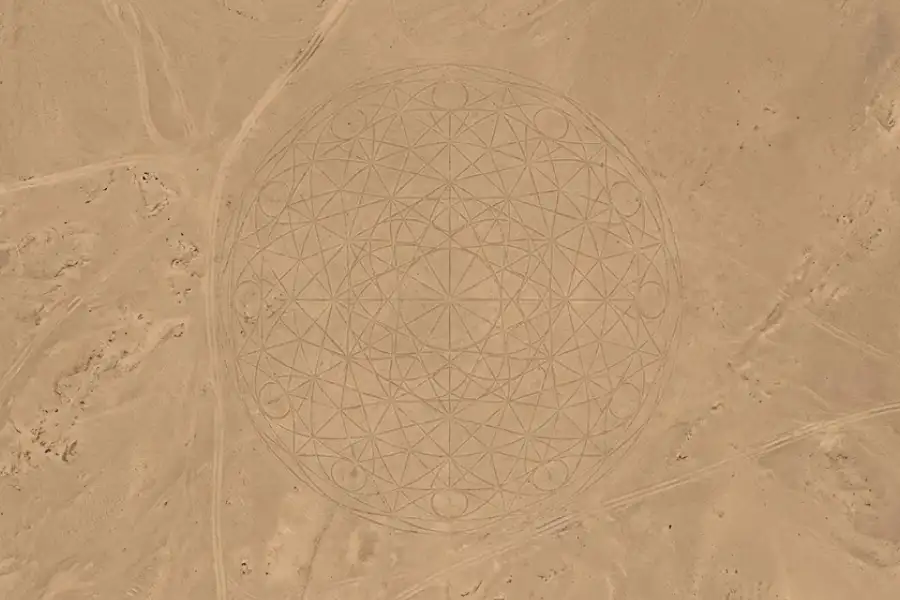
If you enter the coordinates 37 degrees 24 minutes 05.7 seconds North, 116 degrees 52 minutes 04.1 seconds West, you will find a large circular symbol carved into the Nevada desert floor. It features overlapping circles and lines that create an almost mystical looking pattern when viewed from above. Its creators and purpose remain a mystery.
The SOS Message in the Maldives
Near Gan International Airport in the Maldives, satellite imagery captured a giant SOS message spelled out on empty ground. The letters are massive enough to be clearly visible from space. Nobody knows for sure whether it was a real distress call or just someone having fun with satellite photography.
The Antarctic “Alien Face”
At certain coordinates in Antarctica, ice formations and shadows create what looks exactly like an alien face staring up at you from the frozen surface. It is completely natural, caused by the way light and terrain interact. But it is still pretty creepy when you first spot it.
Google Maps Easter Eggs That Were Removed (But Never Forgotten)
Not all easter eggs last forever. Google regularly removes them, sometimes because they were seasonal, and sometimes because the Maps platform gets updated. Here are a few beloved ones that are no longer available but deserve to be remembered.
- “Swim the Atlantic Ocean” directions between continents were removed as Google Maps matured, but they remain the most iconic Maps easter egg ever.
- The Mordor walking directions warning disappeared after Google Maps left beta, though fans still talk about it constantly.
- Dragon travel in Wales was a limited time feature that captured hearts worldwide before being quietly removed.
- Google Moon’s cheese surface at maximum zoom was eventually replaced with more realistic lunar imagery.
Google has a philosophy of keeping easter eggs temporary and surprising. As one Google designer once put it, they believe in the magic of “here today, gone tomorrow.” That is what makes finding an active easter egg feel so special. You never know how long it will stick around.
How to Find Google Maps Easter Eggs on Your Own
Want to go hunting for easter eggs yourself? Here are some tips that will help you find surprises in Google Maps.
- Use the desktop version. Many easter eggs, especially the Pegman costume changes, only work on a computer. The mobile app does not always show them.
- Try famous and unusual locations. Google loves to add easter eggs at places with strong cultural connections. Think landmarks, movie locations, and places surrounded by legends or mysteries.
- Drag Pegman everywhere. Do more than click on Street View. Pick up Pegman and hover him over different areas. His appearance might change in ways you do not expect.
- Zoom all the way in and all the way out. Some surprises only appear at certain zoom levels. The Moon cheese easter egg is a perfect example of this.
- Check Google Earth too. Google Earth has its own set of easter eggs that are separate from Google Maps. The 3D view often reveals things you cannot see in the flat map.
- Search for fictional places. Type in locations from movies, books, and TV shows. Google has a history of adding real Street View tours for fictional worlds.
Why Does Google Hide Easter Eggs in Maps?
You might wonder why a massive tech company like Google spends time hiding silly jokes and secret features in its products. There are a few good reasons.
First, it keeps people engaged. When users stumble on a hidden surprise, they tell their friends about it. Those friends try it themselves and tell even more people. It creates free word of mouth marketing that money cannot buy.
Second, it shows personality. Google Maps could feel like a cold, boring tool. But these little touches make it feel human and playful. They remind us that real people with a sense of humor built this thing.
Third, it gives people a reason to poke around. Easter eggs give people a reason to poke around in Google Maps even when they do not need directions. And the more time people spend in the app, the more valuable it becomes for Google.
Finally, it is part of Google’s culture. The company has been hiding easter eggs across all its products for over 25 years. It is a tradition at this point, and engineers take pride in coming up with creative new surprises.
Frequently Asked Questions
Are Google Maps easter eggs available on mobile phones?
Some easter eggs work on both mobile and desktop, but many of them, especially the Pegman costume changes, are only visible on the desktop version of Google Maps. If you want the full experience, use a computer.
Does Google still add new easter eggs to Google Maps?
Yes, Google continues to add new easter eggs, though they do not announce them publicly. Some appear around holidays or to celebrate special events. The best way to find new ones is to check in regularly and keep an eye on tech news sites.
Can I find easter eggs on Google Earth too?
Absolutely. Google Earth has its own collection of easter eggs and hidden surprises. The 3D buildings view, satellite imagery, and special location markers all contain secrets worth looking into.
Why do some easter eggs disappear?
Google treats many easter eggs as temporary features. Some are tied to specific events, movie releases, or holidays. Others get removed when Google updates its Maps platform. This is intentional because it keeps the surprises feeling fresh and special.
What is the most famous Google Maps easter egg?
The “Swim the Atlantic Ocean” driving directions are widely considered the most iconic Google Maps easter egg ever. The Lord of the Rings “One does not simply walk into Mordor” warning is a close second.
Are the strange satellite images on Google Maps real?
Yes, the satellite images are real photographs captured by satellites orbiting the Earth. Some unusual sightings, like the Antarctic “alien face,” are natural formations that look strange when viewed from above. Others, like the Nevada desert symbol, were genuinely created by someone on the ground.