DVD Screensaver Easter Egg: How to Find It and What Happens
You are sitting at your desk, browser open, and Google is staring back at you like it always does. But what if I told you that a few keystrokes can turn that very familiar search page into something that looks like your living room TV from 2003? That is what happens with Google’s hidden DVD screensaver Easter egg. It is real, it is free, and most people have never heard of it.
In this article, you will learn what this Easter egg is, how to trigger it in seconds, the surprising history behind the bouncing DVD logo, and why Google even bothered to build this in the first place. There is more to this story than you might expect.
What Is the Google DVD Screensaver Easter Egg?
A Google Easter egg (which functions just like a classic software egg) is a hidden surprise added to Google’s search engine. You trigger it with a specific search, and something unexpected happens on screen. Google has done this for years. Some Easter eggs let you play games. Others create funny animations. The DVD screensaver Easter egg does something very specific: it makes the Google logo bounce around your screen the same way the DVD logo did on old DVD players back in the early 2000s.
The logo lifts off from its usual spot at the top of the page and starts drifting diagonally across the screen. It hits the edges and bounces off. It keeps moving. It keeps bouncing. And if you wait long enough, it might just hit a corner perfectly.
Sound familiar? It should. That bouncing logo was one of the most recognizable things about owning a DVD player. Google turned it into a tribute, and it is still working today.
How to Trigger the DVD Screensaver Easter Egg on Google
Getting this to work takes about ten seconds. Here is what to do:
- Open a desktop computer or laptop. This Easter egg does not work on phones or tablets.
- Go to Google.com in any modern browser. Chrome, Firefox, Safari, and Edge all work fine.
- Type DVD screensaver into the search bar and press Enter.
- Wait about five seconds after the results appear.
- Watch the Google logo detach from its spot and start bouncing across the page.
You can also search for DVD bouncing logo and get the same result. The animation starts on its own. You do not need to click anything extra. Just wait, and it begins.
One important note: this only works on desktop devices. If you try it on a phone or tablet, nothing happens. The experience is meant to feel like watching a big screen, so the desktop-only restriction makes sense when you think about it.
Why Did the DVD Logo Bounce in the First Place?
This part surprises a lot of people. The bouncing DVD logo was not created just to look cool. It had a real, specific job to do.
Back in the late 1990s and early 2000s, most people watched TV on CRT televisions. These were the big, heavy screens with the thick backs. If you left a still image on a CRT screen for too long, the bright parts of that image could permanently damage the screen. This problem is called screen burn-in. The phosphor coating inside the screen would wear down in the exact spots where the bright image sat. You could literally see the ghost of the image even when the TV was off.
The solution was to keep the image moving. A moving image could not burn into one spot. So engineers built the bouncing DVD logo specifically to prevent that damage. Every time the DVD player sat idle, the logo would start drifting around the screen, never staying in one place long enough to cause harm.
There was also another reason. Early DVD players had relatively weak hardware. If the laser inside the player stayed pointed at one spot on a disc for too long, it could overheat and damage the disc’s reflective layer. The screensaver kept the laser moving, protecting both the disc and the player.
What started as a boring engineering fix accidentally became one of the most iconic images of an entire era.
The Corner Hit: Why People Lose Their Minds Over It
Ask anyone who grew up in the DVD era about the corner hit, and watch their face change. There is something about that moment when the logo slides perfectly into an exact corner of the screen that feels completely electric.
The reason it feels so rare is because it genuinely is rare. A YouTube livestream that tracked corner hits found that out of 27,500 wall bounces, only 49 were perfect corner hits. That works out to roughly one corner hit for every 562 wall bounces. Some estimates say it can take anywhere from 2 to 45 minutes to see a corner hit, depending on the screen size and the size of the logo itself.
The math behind predicting a corner hit is surprisingly complex. The time it takes depends on the screen’s width and height, the logo’s size, and the starting position. Because every TV and every DVD player was slightly different, no two screensavers behaved the same way. That unpredictability is a big part of why people found it so compelling to watch.
The good news for Google’s version: the corner hit does happen. The bounce angles are accurate, and the logo can hit all four corners. When it does, it feels just as good as it always did.
The Office Made This a Cultural Moment
The DVD screensaver became a mainstream cultural touchstone largely because of one television show. In Season 4, Episode 3 of The Office, titled “Launch Party” (which aired October 11, 2007), the cast is gathered in the conference room while Michael Scott leads a meeting about quarterly reports. The employees appear unusually engaged, hanging on every word. Then the camera cuts to Jim, who reveals in a talking head that the whole office is watching a DVD screensaver on the TV behind Michael the whole time, waiting for the logo to hit a corner.
The tension builds. Andy has an emotional near-miss moment. Kevin is completely invested. Finally, the logo slides perfectly into the corner and the entire office erupts in celebration before walking out of the meeting entirely.
Here is a behind-the-scenes detail most people do not know: the perfect corner hit in that scene was not real. The DVD logo was added in post-production during editing so the timing could be controlled. The writers and crew had to use movie magic to capture the moment because waiting for a real corner hit would have been completely unpredictable on set.
That episode introduced the corner hit to millions of viewers and cemented the DVD screensaver as a shared cultural memory rather than just a background feature nobody thought about.
Where Did the DVD Logo Come From?
The bouncing DVD logo was not created by any single DVD player manufacturer. It was introduced by two international organizations: the DVD Forum and the DVD Format/Logo Licensing Corporation, which was a Tokyo-based company established in 2000 with the goal of standardizing the DVD format globally. The logo itself was meant to be a universal mark of quality, a stamp that said this product meets the standard. When DVD players displayed it as a screensaver, they were essentially showing off their certification while also protecting their hardware.
The first versions appeared on DVD players around 1997. By the early 2000s, it was everywhere. Every living room, every classroom, every hotel room with a DVD player had the same bouncing logo drifting across its screen. That universal experience is a big reason the screensaver became such a shared memory across an entire generation.
Why Did Google Build This Easter Egg?
Google launched this Easter egg in May 2021. At the time, TechCrunch covered it and noted that Google had not released a notable Easter egg in a while. The DVD screensaver egg stood out because it was not tied to a movie release or a brand partnership. It was simply a tribute to something a lot of people remembered fondly.
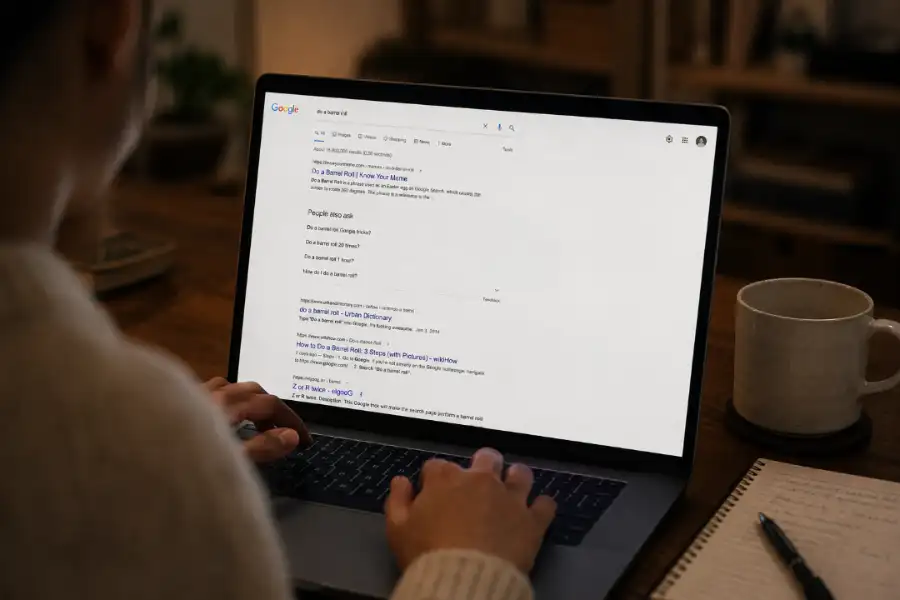
Google has a long history of these kinds of surprises. Search “do a barrel roll” and the page spins. Lose your internet connection in Chrome and a dinosaur game appears. Search “Thanos” and half your search results get snapped away. These Easter eggs do not add any real function to Google. They exist purely to make people smile for a moment.
The DVD screensaver Easter egg works especially well because it taps into a very specific kind of nostalgia. For anyone who grew up watching movies on DVD in the early 2000s, that bouncing logo is tied to specific memories: a Friday night with family, a movie day at school, a lazy Sunday afternoon when nobody turned the player off. Google knew that. The Easter egg goes beyond a simple trick. It is a small emotional moment dressed up as a search result.
Other Ways to Experience the Bouncing DVD Logo
If you want more of this, there are a few other options worth knowing about:
- BouncingDVDLogo.com is a dedicated website that does just what the name says. You can watch the logo bounce on a full black background just like the original screensaver did.
- YouTube livestreams have been running the screensaver for years, with some channels even tracking how many times the logo hits a corner. Some of these streams have racked up millions of views.
- The Coinbase Super Bowl commercial in 2022 went viral by putting a single bouncing QR code on a black screen for 60 seconds. It was a direct nod to the DVD screensaver format, and it worked so well that it crashed the Coinbase app from the traffic it generated.
Other Google Easter Eggs Worth Trying
While you are in the Easter egg mood, here are a few others that still work in 2026:
- Search do a barrel roll and the whole page spins once.
- Search Google askew and the page tilts slightly to one side.
- Search pac-man and a playable Pac-Man game appears in the results.
- Search snake game and a classic snake game loads right in the search results.
- Search aurora borealis and click the button that appears to see animated northern lights sweep across your screen.
- Search breathing exercise and an animated guide appears to help you take slow, calm breaths.
None of these affect your searches or your account. They are just quick, fun moments that Google’s engineers built because they wanted to.
Frequently Asked Questions
Does the Google DVD screensaver Easter egg work on mobile?
No. This Easter egg only works on desktop and laptop computers. If you try it on a phone or tablet, you will just see regular search results. Use a desktop browser for the full experience.
Which browsers support the DVD screensaver Easter egg?
It works on Chrome, Firefox, Safari, and Microsoft Edge. Any modern desktop browser should trigger it as long as you are searching on Google.com.
Can the Google Logo Hit the Corner in This Easter Egg?
Yes, it can. The bounce physics in Google’s version are accurate, and the logo can hit all four corners of the screen. Whether it does depends on the size of your browser window and the starting position of the logo.
Did the DVD logo really ever hit the corner on real DVD players?
Yes, but it was rare. Research from YouTube livestreams showed a corner hit occurred about once every 562 wall bounces. Time estimates range from 2 minutes to 45 minutes depending on screen size and logo size.
When did Google add the DVD screensaver Easter egg?
Google added this Easter egg in May 2021. It was first reported by TechCrunch and quickly spread across social media as people shared it with others who remembered the original DVD screensaver.
Are Google Easter eggs safe to use?
Yes, completely. Google Easter eggs are made by Google’s own engineers and live inside Google’s own products. They do not install anything on your device, do not affect your privacy settings, and have no effect on search rankings or your account.