18 Hidden Features of Apple Watch You Might Never Try
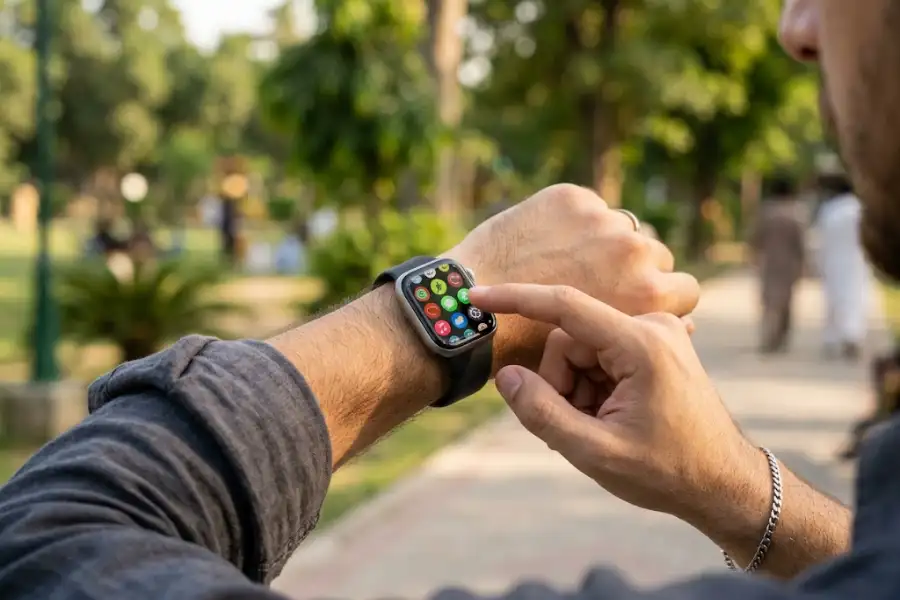
Your Apple Watch does more than show the time and count your steps. Tucked inside its menus are small tools that most owners never touch. Some of these hidden features of Apple Watch protect your health. Others save you time or keep you safe on a hike. This article covers real tools you can turn on today, checked against the current watchOS software.
Why These Features Stay Hidden
Apple adds new tools with almost every software update. Most people open the Watch app once, set a few basics, and never look again. That means good tools sit unused for years. The same thing happens across Apple’s other devices too. If you own an iPhone, you might want to check out these hidden iPhone features once you finish this list, since many settings work as a pair.
Health and Safety Tools You May Have Missed
Your watch tracks more than heart rate and steps. These health tools run quietly in the background.
Check In Tells Your Family You Are Safe
Check In lets a friend or family member know when you leave one place and arrive at another. Open the Messages app, pick a contact, tap the plus icon, and select Check In. If you do not check in within a set time, your emergency contact gets an alert with your last known spot and battery level.
Time in Daylight Tracks a Habit You Forget
Getting sunlight each day helps your sleep and mood. Your watch already tracks this for you. Since watchOS 10, the Health app has quietly logged your Time in Daylight using the watch’s ambient light sensor. No app or setting is needed. Open the Health app and tap Time in Daylight to see your history.
The Noise App Warns You About Loud Places
Loud places can hurt your hearing over time. The Noise app on your watch measures the sound level around you and buzzes your wrist when it gets too loud. Add it to your watch face as a small tile so you can check it at a glance.
Sleep Apnea and Heart Signal Alerts
Newer Apple Watch models can flag signs of sleep apnea and irregular heart rhythm while you sleep. Some Series 11 models also watch for signs linked to high blood pressure. These alerts are not a diagnosis. Talk to a doctor if your watch sends one.
Medication Reminders Keep You on Track
The Health app lets you log every pill, vitamin, or supplement you take. Set a schedule once, and your watch taps your wrist at the right time each day. You can mark a dose as taken right from your wrist.
Emergency SOS and Satellite Help Reach Rescuers
Hold the side button, and your watch calls emergency services, even without your phone nearby on cellular models. Newer Ultra and Series models with satellite support can also send an SOS message when you have no cell signal or WiFi at all, as long as you have a clear view of the sky.
Everyday Tricks That Save You Time
These small tools remove extra taps from tasks you already do daily.
Double Tap Skips the Screen Touch
Tap your thumb and index finger together twice, and your watch answers a call, stops a timer, or opens your most used widget, without touching the screen. This works on Series 9 and later, and on Ultra 2 and later. Turn it on under Settings, then Gestures.
Auto Unlock Logs You Into Your Mac
Skip typing your Mac password. With Auto Unlock turned on, your watch senses you sitting near your Mac and lets you in with a quiet tap on your wrist. Turn it on inside System Settings on your Mac under Touch ID and Password.
Scribble Turns Your Finger Into a Pen
When a reply box pops up, draw each letter on the screen with your finger instead of typing on the small keyboard. The watch reads your handwriting and turns it into text in seconds.
Ping Your iPhone With One Press
Lost your phone somewhere in the house? Swipe up on your watch face to open Control Center, then tap the iPhone icon. Your phone rings, even if the ringer is off.
Water Lock Clears Water After a Swim
Turn on Water Lock before you swim, and your screen stops reacting to touch so you do not pause your workout by accident. When you finish, turn the Digital Crown, and the watch plays a small sound that pushes water out of the speaker.
Download Music and Podcasts for a Phone-Free Run
Leave your phone at home during a workout. Open the Music or Podcasts app on your watch, connect to WiFi, and download your playlist ahead of time. Pair a set of Bluetooth headphones, and you can run, lift, or bike with sound and no phone in your pocket.
Tools for Outdoors and Travel
Backtrack Gets You Home on a Trail
Apple Watch Ultra models can record your path as you walk, hike, or bike. If you get turned around, open Backtrack in the Compass app, and it draws your route back to where you started, even with no cell signal.
Turn Off CarPlay Turn-By-Turn Alerts
If your wrist buzzes every time CarPlay gives directions, you can turn that off. Go to the Watch app on your iPhone, open CarPlay, and switch off turn-by-turn haptics. Your watch stays quiet while your car handles the directions. For more small settings like this on your paired phone, the iPhone 17 Pro Max hidden tools list covers several others worth trying.
Check Your Cellular Signal Strength
Cellular Apple Watch models can call, text, and stream music without your phone nearby, but a weak signal can drain your battery fast while it searches for a connection. If your paired iPhone also loses signal often, running the iPhone field test mode can show you the exact signal numbers in your area instead of just bars.
Tools That Make the Watch Easier for Everyone
Assistive Touch Works Without Touching the Screen
Assistive Touch reads small movements in your wrist and hand, like a clench or a pinch, and turns them into taps and swipes. This helps anyone who finds the small screen hard to use directly. Turn it on under Settings, then Accessibility.
Raise to Speak Skips the Wake Word
You do not always need to say “Hey Siri.” Turn on Raise to Speak, lift your wrist near your mouth, and start talking. Siri listens right away, which is handy in a quiet room or a meeting.
Shazam Finds a Song Playing Nearby
Add Shazam to your Control Center from the Watch app on your iPhone. The next time a song plays in a coffee shop or a store, raise your wrist, tap the Shazam icon, and see the title and artist in seconds.
Small shortcuts like these show up across Apple’s whole lineup, not only the watch. Even the stock Calculator app on your iPhone has one, since the secret backspace trick on iPhone Calculator lets you erase one digit with a swipe instead of clearing the whole number.
Frequently Asked Questions
Do all these hidden features of Apple Watch work on every model?
No. Some tools, like Double Tap and Backtrack, need a Series 9 or later, or an Ultra model. Older watches still get Check In, Time in Daylight, and Auto Unlock.
Will these features drain my battery faster?
Most run with very little extra power use, since they rely on sensors that are already active. Cellular features and constant heart checks use more battery than screen-based tools.
Do I need the newest watchOS to use these tools?
Some tools, like Double Tap and the newer health alerts, need watchOS 10 or later. Update your watch through the Watch app on your iPhone to get the full list.
Can I turn any of these features off later?
Yes. Every tool on this list lives inside Settings or the Watch app on your iPhone, and you can switch each one off at any point.
Your Apple Watch Still Has More to Give
You bought your Apple Watch for the basics, but it holds far more than steps and notifications. Try one tool from this list today, whether it is Check In before your next walk or Double Tap during your next workout. Small habits like these are what make the hidden features of Apple Watch worth the extra minute it takes to turn them on.