Ford SYNC 4 Hidden Features: 9 Tricks Most Owners Never Find
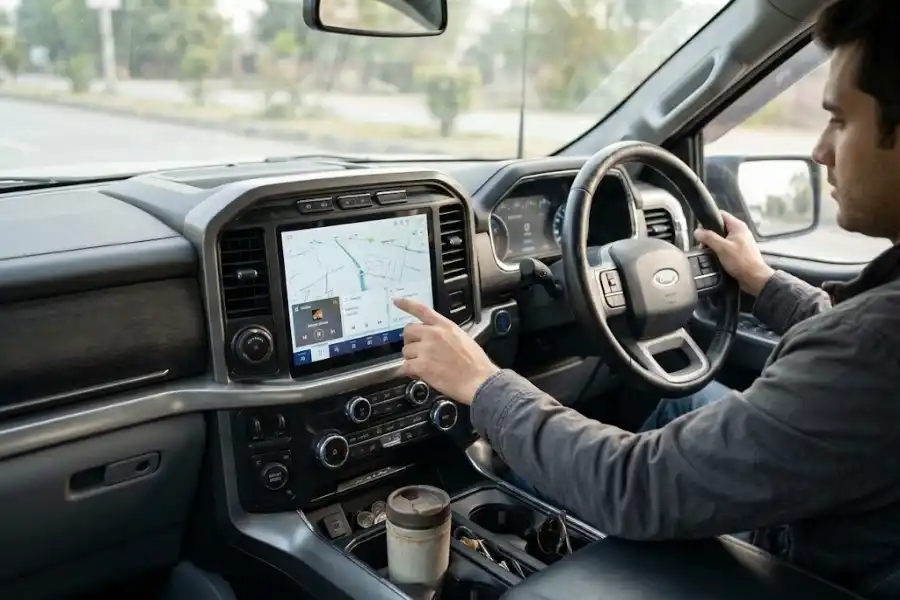
Your Ford screen can do more than you think. Most drivers use the radio, the map, and the phone link. That is where it ends.
But the Ford SYNC 4 hidden features go further. Some save time. Some fix problems fast. One even draws a rose on the screen.
We checked Ford’s own support pages, press notes, and owner reports to build this list. Menu names can change by model year. Treat each step as a map, not a rule. Check your owner’s manual too.
First, Check Which SYNC You Have
SYNC 4 and SYNC 4A are close cousins, not twins. Ford says SYNC 4 cannot be upgraded to SYNC 4A. A few tricks below only work on 4A.
Here is a quick way to check. Log in to Ford’s owner site. Pick your vehicle from your garage. Choose Check for updates. Your SYNC version shows on the page.
1. Save Up to Three Personal Profiles
This is one of the best Ford SYNC 4 hidden features for shared cars. A profile saves your seat, your cabin temperature, and your ambient lighting.
Ford says you can make up to three profiles. They match the three options on the driver door panel.
Here is how to set one up:
- Park the vehicle and keep it running.
- Tap Settings on the SYNC screen.
- Open Personal Profile and switch it on.
- Tap Add Profile and follow the steps.
You can add a photo or pick a Ford image. You can also link your phone as a key. Some profiles show start-up ideas too, like a radio station, a person to call, or a place to get directions.
Not every model has this. Your owner’s manual will tell you.
2. Talk Like a Normal Person
SYNC 4 uses cloud-based voice. That means you do not need to learn set phrases. Ford says you can speak in a natural way to find places and send texts.
On some models, you say “Hey Ford” first. TechRadar reported that wake phrase for the Mustang Mach-E.
Here is a small tip from owners on an F-150 forum. They say a long press on the steering wheel voice button brings up Google Assistant. A short press opens Ford’s own voice system. Try both on your vehicle and see which one it uses.
3. Reboot a Frozen Screen in 10 Seconds
A frozen screen is a pain. You do not need a dealer for most of these. Ford calls the fix a system reset.
If your car has a power button on the radio, hold two things for 10 seconds. Hold the Power button (the center of the volume knob). Hold the Seek Right button at the same time.
If your car has no power button, use the steering wheel. Hold Volume Down and Seek Right for 10 seconds.
Ford says this reset does not erase your stored data. Ford even sent a service message about this reboot for some 2021 models, including the Mach-E, F-150, and Edge.
Do not jump to a factory reset. That one erases all stored data. You find it under Settings, then Reset, then Factory Reset. Use it only if the quick reset fails. If the screen still acts up, call your dealer.
4. Find the Rose in the Sketch App
This is the fun one. It works on SYNC 4A vehicles, like the Mustang Mach-E.
Open the Sketch app. Tap the tab at the top of the screen again and again for four seconds. A red rose drawing appears.
Ford Authority reported that a Ford software engineer hid it. He led the work on the Sketch app and added the rose for his daughter. It is a sweet touch.
Software makers have hidden small surprises like this for decades. We cover the idea in our post on software eggs.
5. Use Adaptive Dash Cards
Menus waste time. Dash cards fix that. Ford lists Adaptive Dash Cards as a SYNC 4A feature on select models.
The cards sit in a row under the main screen. They show your recent or popular items. One card can show the next step on your route. You can tap the cards to act.
SYNC 4 also learns from how you drive. Ford says it uses machine learning to offer smart tips for calls and trips. The more you use it, the better the tips get.
6. Keep Your Phone Wireless
SYNC 4 supports wireless Apple CarPlay and Android Auto. You do not need a cable for every trip. Ford also supports AppLink apps, like Waze.
AppLink can also add phone controls for some vehicle features. Ford has named lights, climate, and the radio. This depends on how your vehicle is equipped.
Your phone has its own tucked-away settings too. Our list of iPhone hidden features shows a few worth checking before your next drive.
7. Check for Over-the-Air Updates
SYNC 4 can get updates over the air. That means Ford can send fixes and new features without a dealer visit.
Do not ignore update prompts. They often fix small bugs. You can also use the Check for updates link on Ford’s owner site.
Connected features need a working modem and an active connected service. Ford also says coverage depends on the AT&T network. A weak signal can limit what works.
8. Run Your Vehicle from the Ford App
Download the Ford app (older pages still call it FordPass). Sign in and add your vehicle. Then your phone can do more than you may expect.
Remote start is one of the most used tools. Other features depend on your model and plan. Ford says connected features need the modem to be active.
9. Look Up Parking in Navigation
Ford showed off optional navigation that can share parking space availability and prices. That can save you a lot of circling.
Connected navigation needs SYNC 4 and FordPass Connect, which is optional on select vehicles. Ford also says you must start the free service trial through the Ford app.
No connected navigation in your car? Your phone can fill the gap. Our Google Maps tips and hidden features post is a good place to start.
A Quick Warning About Hidden Menus and Add-On Tools
Some owner videos talk about tools like FORScan. These tools can switch on settings hidden in a vehicle computer.
That sounds fun. But one wrong change can cause problems. It may also raise warranty questions. Ask your Ford dealer before you try anything like that. The Ford SYNC 4 hidden features in this post are safe, normal settings.
Frequently Asked Questions
Does SYNC 4 support wireless Apple CarPlay and Android Auto?
Yes. Ford says SYNC 4 supports both without a cable. It also works with AppLink apps like Waze.
How do I reset a frozen SYNC 4 screen?
Hold the Power button and the Seek Right button for 10 seconds. If your car has no power button, hold Volume Down and Seek Right on the steering wheel. This quick reset does not erase your stored data.
What is the difference between SYNC 4 and SYNC 4A?
They are two different versions. Ford says you cannot upgrade SYNC 4 to SYNC 4A. Adaptive Dash Cards and the Sketch app rose belong to SYNC 4A vehicles.
Can I update SYNC 4 without going to a dealer?
Often, yes. SYNC 4 supports over-the-air updates. You can also check for updates on Ford’s owner site by picking your vehicle.
Final Thoughts
You paid for a smart screen. Now you can use more of it. Start with personal profiles and the quick reset. Then try voice, dash cards, and updates.
The best Ford SYNC 4 hidden features are not magic. They are just tucked away in menus. Many other devices do the same, and our post on 10 hidden Roku features shows how common that is.
Pick one trick today. Try it on your next drive.